If your contract follows the market, you have probably had this happen. The Energy dashboard shows a cost for yesterday. You look again a day later and it is different. Or one hour holds a spike of energy nobody used, priced at whatever that hour cost.
You are not imagining it, and you are not alone:
"But for some reason the dashboard always calculates more than it should." — odechr, Home Assistant forum thread 496113
"showing a cost/income far higher than realistic." — andreaskin, thread 647174
This is not a bug you can find in your own configuration, which is why it survives so many evenings of looking for one. It is a mismatch between two resolutions.
The mechanism, in one paragraph
Home Assistant costs energy from its long-term statistics, which are hourly. For a fixed tariff that is exactly right: an hour at one rate is an hour at one rate. For a contract that re-prices during the day, the hour is the problem — and when something interrupts the recording, the hour becomes the whole problem.
The clearest description of it was written by someone it happened to:
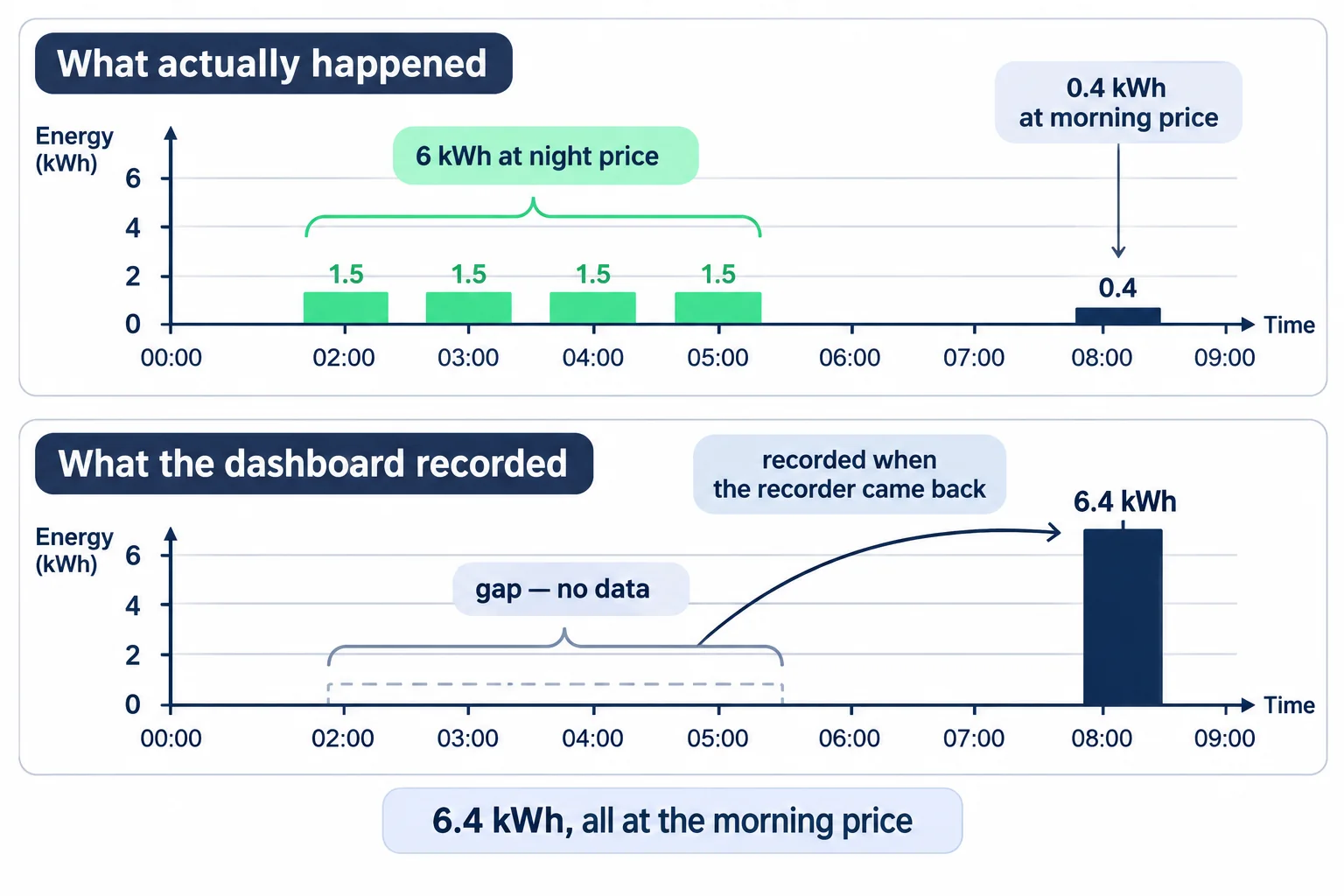
"It is just adding all the energy you missed to the hour the system was turned back on." — anon11644107, thread 965144
So: Home Assistant restarts, or a sensor drops out and comes back, and the counter jumps. The energy of the gap is real — your meter counted it — but it arrives all at once, lands in the hour of the restart, and is costed at that hour's price. If the gap crossed the cheapest night hours and you came back at breakfast, you have just bought the night at the morning price.
The same shape appears in other forms. A sensor integration can multiply by a thousand after a restart — that one is an open issue in Home Assistant core, #136428, reported as:
"After a Home Assistant restart, the value of a sensor integration is multiply by 1000" — roumano, core #136428
And a device that loses power can reset its own counter to zero, which the receiving side reads as consumption:
"This causes our Shelly 3EMs to reboot and then HA records a major peak of 1000's of kWh being consumed." — msa, thread 479362
None of this is Home Assistant being badly built. Hourly statistics are a reasonable design, and the workarounds people share — availability templates, correcting rows in Developer Tools → Statistics, choosing the left method on a Riemann integration — all work. They are just a lot of evenings for a number that should not need defending.
What changes when the price is applied where the energy is measured
The alternative is not a better dashboard. It is moving the decision one step earlier, to the device that is doing the measuring.
An RBgrid hub resolves one price for each 15-minute period: from the day-ahead source you choose for your zone, from a backup if the first has nothing for that period, and otherwise from your own tariff plan. Your contract is applied on top — a factor, a markup, then the per-kWh taxes, grid fee and levy of your plan, then VAT — unless the source already publishes the retail price, in which case nothing is added and nothing is counted twice.
Then it does the part that matters for this article: it stores the price it used beside the energy it used it on, with the source of each period, and keeps that for 40 days.
Three consequences follow, and they are the whole argument:
- A gap stays a gap — on the hub. The hub keeps measuring and costing while Home Assistant is restarting, because neither job lives in Home Assistant. Its own record has no wrong hour, and nothing has to be reconstructed afterwards. What Home Assistant then shows depends on how the hub's data reaches it, and that is the next section.
- A price is attached to its own energy. The cost of 02:15–02:30 was computed from the price of 02:15–02:30, at the time, and that pairing is written down. It does not depend on which hour the number is read in later.
- You can check it. Not "trust the figure" — read the row.
Home Assistant's statistics stay hourly. This article is not telling you otherwise, and nothing here changes what the Energy dashboard stores. The 15-minute money lives on the hub and in its own log; what reaches Home Assistant is the hourly view it has always kept.
What actually reaches Home Assistant, and by which route
The hub's record and the Energy dashboard are two different things, and the second depends on how you connected them. This matters more than it sounds, because it decides whether the restart hour still shows a jump on your screen.
- If the Energy dashboard takes its cost from the hub's own cost entity, the hour it shows is a sum of periods the hub priced individually — not one hourly average applied to a lump of energy.
- If you kept your own price sensor on top of the hub's energy, Home Assistant costs it the way it always did, at the resolution it always had. The hub's log and the dashboard will then disagree, and the log is the one with the periods in it.
- A restart still interrupts what Home Assistant records, whatever the hub did meanwhile. Your energy and your money are intact on the hub. Whether the gap gets repaired inside Home Assistant depends on the route — and on one setting, which is the part worth knowing about.
The hourly statistics import, and the setting nobody mentions
The RBgrid integration belongs to one of the two ways of running the hub: the hub flashed as an ESPHome device. If your hub runs the standalone firmware and reaches Home Assistant over MQTT, there is no import to turn on — moving between the two is a reflash, not a setting, so this is a choice made at the start rather than a switch you flip later.
On that route, every hour the integration asks the hub for its own hourly book and writes it into Home Assistant's long-term statistics as a second set of rows, alongside the ones Home Assistant already keeps for your live sensors — each hour with the energy and the cost the hub computed for that hour. It runs by itself, once an hour, catching up from wherever it left off, so a pause of days is filled in hour by hour rather than dumped into one; the Import into HA statistics button on the panel's History tab runs that same pass immediately rather than being a separate mechanism. In Home Assistant's own pickers the rows appear with names like RBgrid Hub Main energy in and … cost.
⚠️ By default your Energy dashboard is not looking at those rows. The integration's setup wizard connects the dashboard to the live counters, and on those a restart still shows the familiar step in the hour Home Assistant came back. The imported rows, which have no gap, are available in the Energy dashboard's source settings — you have to choose them.
So the honest shape is three-layered: the hub's own record never has a wrong hour; the imported statistics give Home Assistant a copy of that record without gaps; and the dashboard shows whichever of the two you point it at.
How to check your own bill, line by line
This is the part to do once, so the next time a figure looks wrong you have somewhere to look.
- Open the hub's Prices page and go to Applied prices.
- Pick the day you want. The table is one row per closed 15-minute period: Period · Buy · Sell · Source.
- Download the CSV. Columns are the start time in the hub's own time, the all-in buy price, the sell price, and the source.
- Compare a stretch you care about with your supplier's statement.
The Source column is the one most people skip and then need. It says where each period's price came from: your primary source, your backup, a price pushed in from Home Assistant, the hour's mean if your contract is settled hourly, or your tariff plan when nothing covered that period. A row that reads plan is not an error — it means no market price was in force for that period, so the zone rate priced it, which is a different number arrived at correctly.
A day can hold fewer than 96 rows. That is not a lost price: the log records the periods the hub was running through, so a restart, an update or a power cut leaves a gap, and the gap means the hub was not there.
What this does not do
Worth saying plainly, because a page about prices is the easiest place to imply more than is true.
- It will not match your supplier's statement exactly. We measure at your clamps; they measure at their meter. The log tells you which periods cost what and why, not what your bill will say.
- It does not switch anything. The hub can tell you — and tell an automation — that a stretch is cheap, as a notification. What runs the dishwasher is Home Assistant, or a diverter, or you.
- It does not change Home Assistant's resolution. See the note above; this bears repeating because it is the thing people hope for.
- It is not a verdict on your contract. Whether a dynamic-price contract suits you is between you and your supplier.
Where to read more
- Where your price comes from — the sources, the fallback chain, what your contract does to a market price.
- How cost is calculated — the chain from a measured kilowatt-hour to money, with the two-branch step for spot and all-in sources.
- Every circuit into Home Assistant — the two ways to run the hub with Home Assistant.
Quotes are reproduced from public Home Assistant forum threads and GitHub issues, with their authors and thread numbers, so you can read each thread in full — including the parts that disagree with this article.