See your electricity as money
Every circuit in your home, costed by your own tariff — on a hub you own.
RBgrid shows what each circuit costs right now, today and this month — on your own tariff zones — stored on a small box in your fuse board. No account, no cloud, no subscription, no ads.
Free for personal, non-commercial use — source-available.
What you need
- An ESP32-WROVER board (PSRAM, 16 MB flash) — one you have, or any you buy; you flash it once over USB.
- One or more rbAmp measurement modules (up to eight per hub), clip-on sensors included or your own SCT-013 clamps.
- Modules from $3.99 (one channel) + $2.50 per extra channel. RBgrid itself is free for personal, non-commercial use — the hardware is the only cost.
Pick your way in
- I want it to just workFlash the release image or build from source, install the web app, run the setup wizard, see your first costs in the app. No code to write.
- I run Home AssistantThe hub announces every point over MQTT; HA creates the sensors itself. A ready table for the Energy dashboard.
- I want to build it my wayFull firmware source, ESP-IDF build, REST, WebSocket and MQTT APIs with a published schema.
What the app shows you
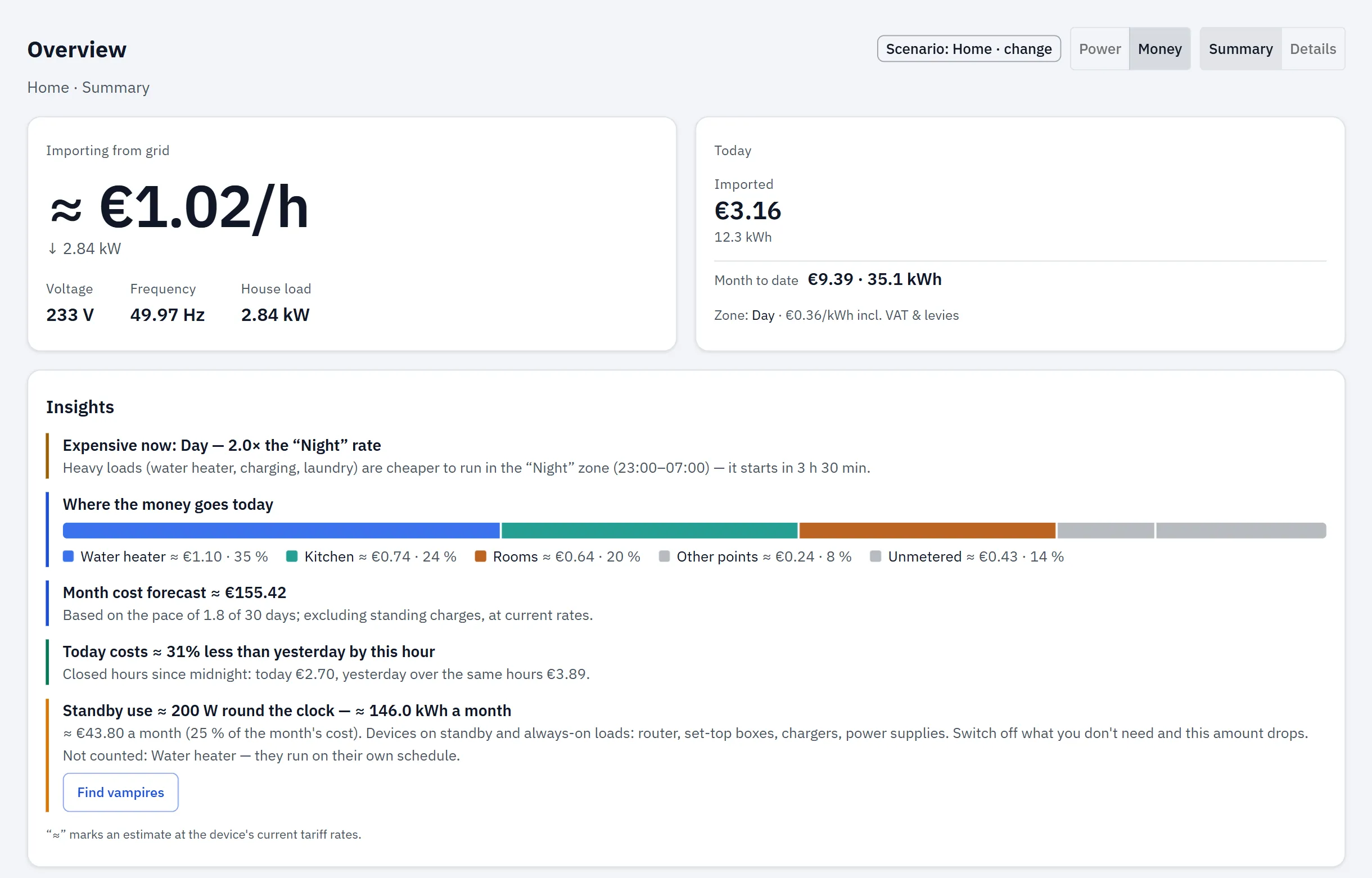
The quantities your tariff is built from — zones, rates, per-kWh taxes and VAT — computed on your own numbers.
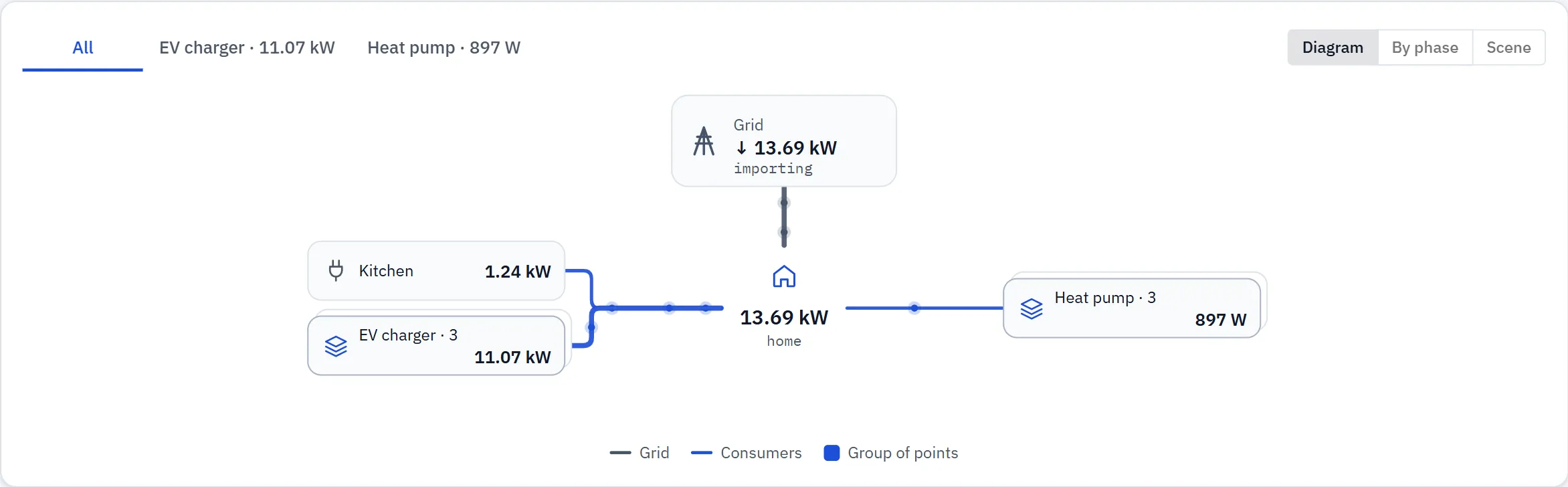
- Cost right now per line and for the whole house, in your currency
- Today and month to date — energy and cost, with yesterday for comparison
- Which tariff zone you are in and when the cheaper one starts
- Where the money goes — share of today's cost by line
- Import and export measured separately, exported energy valued at your own rates
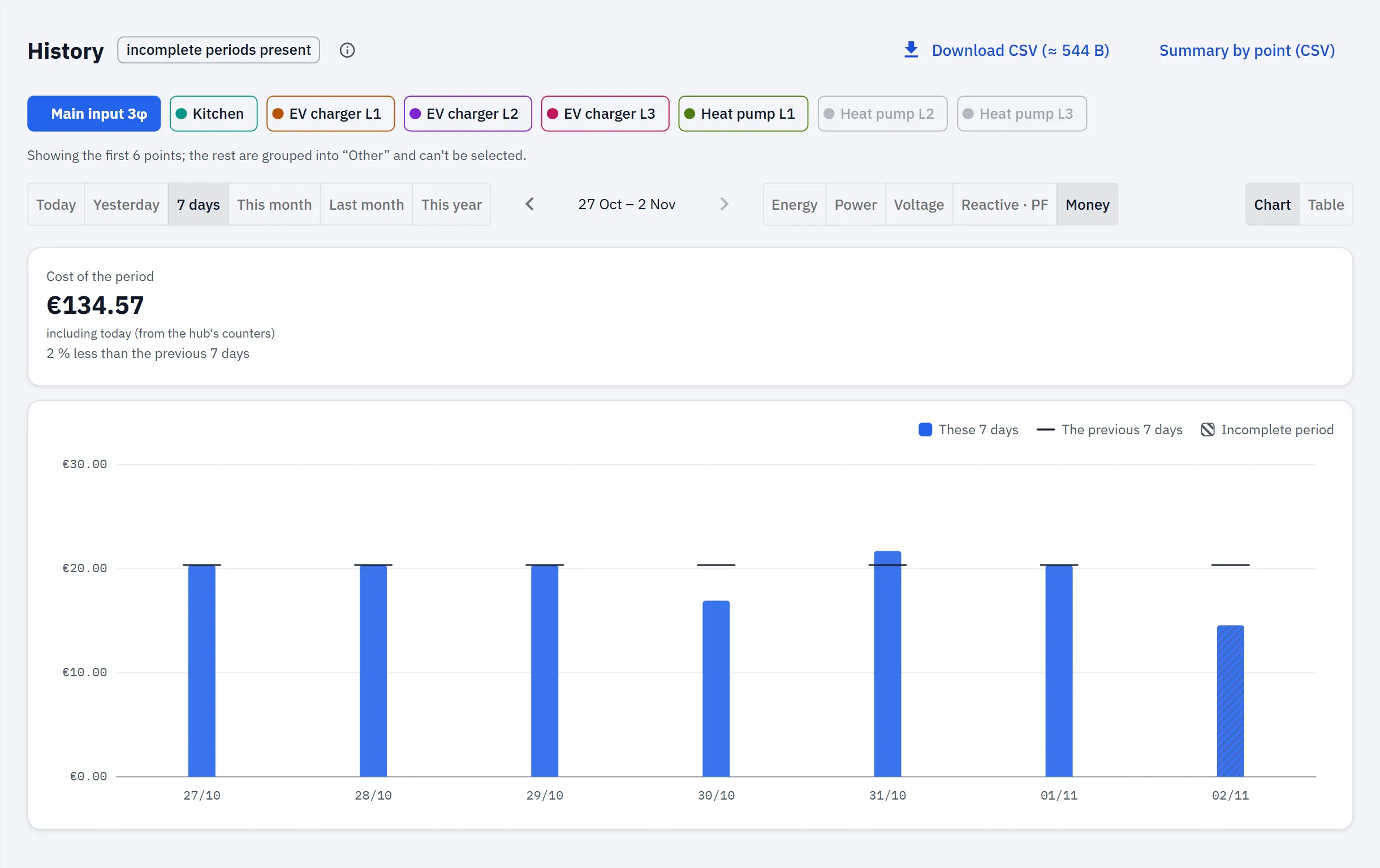
- History from hourly to yearly, on the hub's flash, downloadable as CSV
Tariff depth
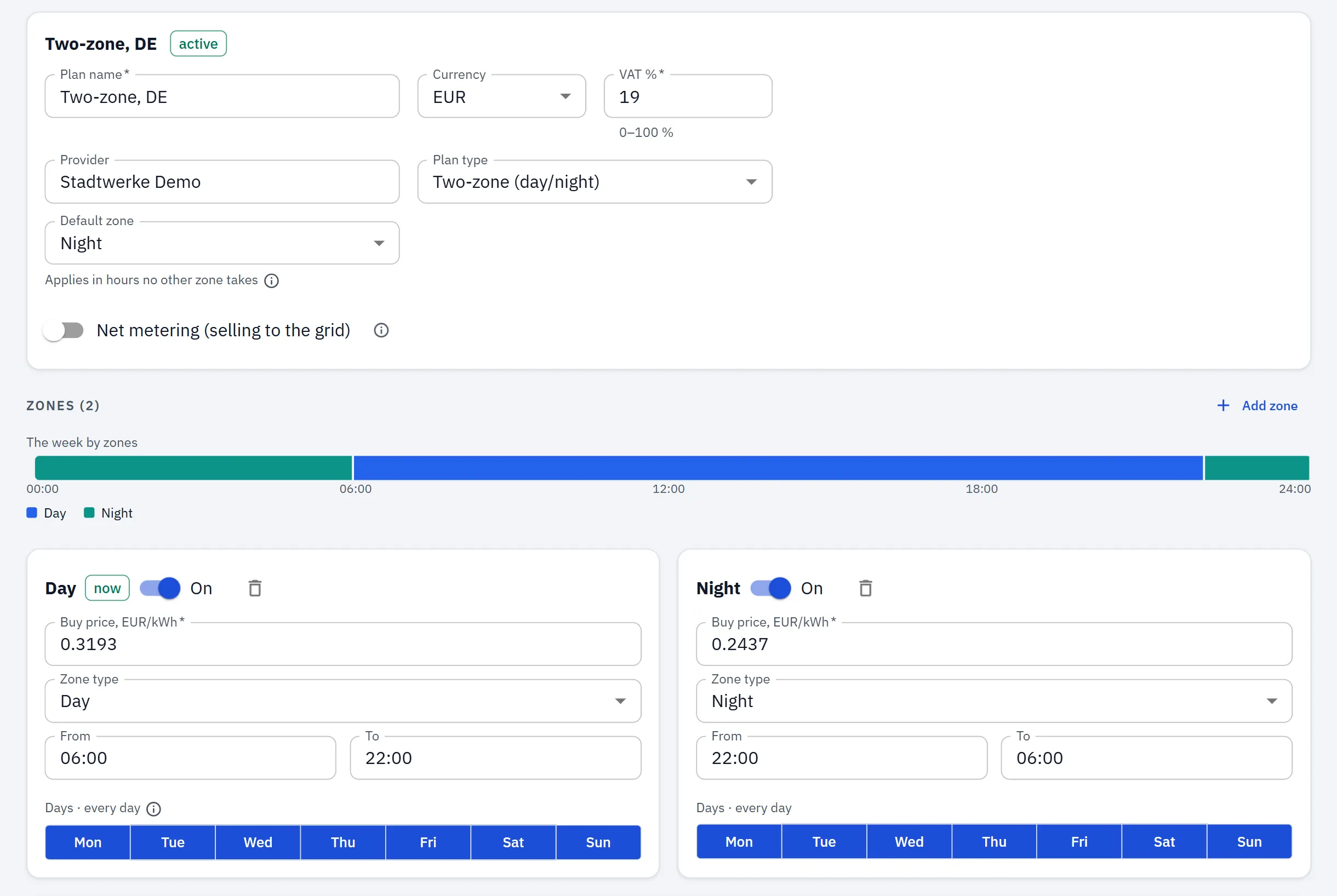
The tariff engine is the heart of RBgrid — time-of-use with named zone types (night, morning peak, day, evening peak, late evening, weekend), plus per-kWh energy tax, grid fee and renewable levy, and VAT — all entered separately and all included in costs, applying your own rates. Export is valued at a per-zone sell price. It runs on the device, and the tariff code is in the source you can read and build (free for personal and non-commercial use).
demo.rbgrid.io
Try it with a home like yours
Five setups built step by step: what to fit, how to set it up, and what the app shows. Each one opens in the live demo too — sample data, no hardware needed.
-
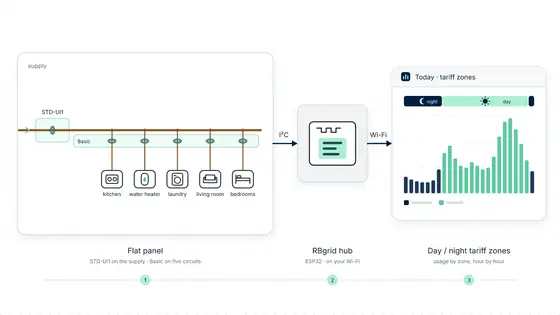
Monitoring a flat: the supply, five circuits and a day/night tariff
Build the RBgrid demo flat on a real hub - an STD-UI1 meter on the supply, five circuits on a Basic module, a day/night tariff - and what the app shows.
Open the live demo -
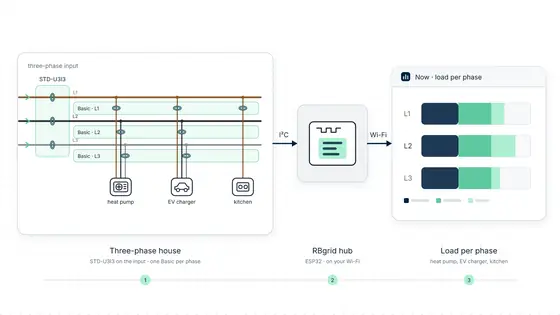
Monitoring a three-phase house: heat pump, EV charger and a day/night tariff
See what the heat pump and the EV charger cost per phase and per tariff zone, on an STD-U3I3 meter and one Basic module per phase.
Open the live demo -
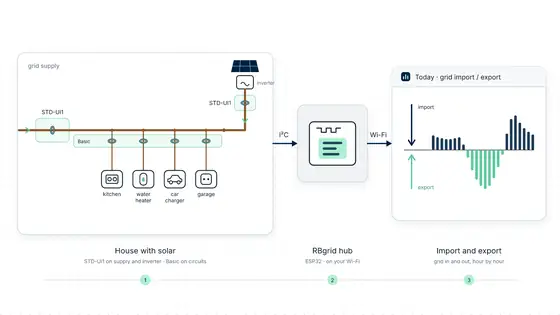
Monitoring a house that exports: solar, a car charger and a day/night tariff
Build the RBgrid demo solar house on a real hub - STD-UI1 meters on the supply and the inverter, circuits on a Basic UI5, export at your sell price.
Open the live demo -
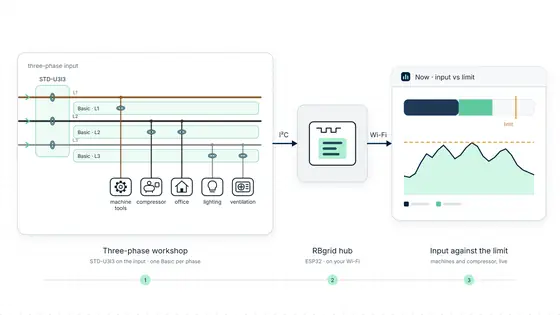
Monitoring a three-phase workshop: machines, a compressor and the input limit
Know which machine runs, what the compressor costs and how close the workshop is to its input limit: STD-U3I3 on the input, a Basic per phase.
Open the live demo -
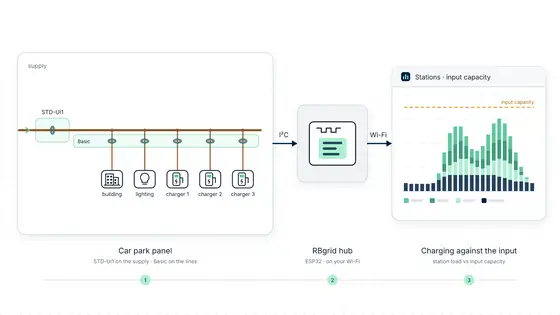
Monitoring a car park: three EV chargers against the input's capacity
Build the RBgrid demo car park on a real hub - an STD-UI1 precise energy meter on the supply, three chargers on a Basic UI5, the Charging stations view.
Open the live demo
Home Assistant, step by step
Three guides that build one working setup, in order: every circuit into Home Assistant, your supplier's tariff on the hub, then a heat pump that follows it.
- A power meter for Home Assistant, from flashing to the Energy dashboardFlash RBgrid on an ESP32, clamp one circuit, and get power and energy into the Home Assistant Energy dashboard over MQTT discovery, with no templates.
- Your own time-of-use tariff on the device, with cost per circuitEnter your time-of-use zones, per-kWh charges and VAT in RBgrid, and see what each circuit costs at the price of the zone its energy was used in.
- Your heat pump on its own line: what it costs, then automate in HAMeasure a heat pump on its own circuit, see what it costs at your day and night prices, then drive its setpoint from the hub's tariff zone in HA.
How it fits together
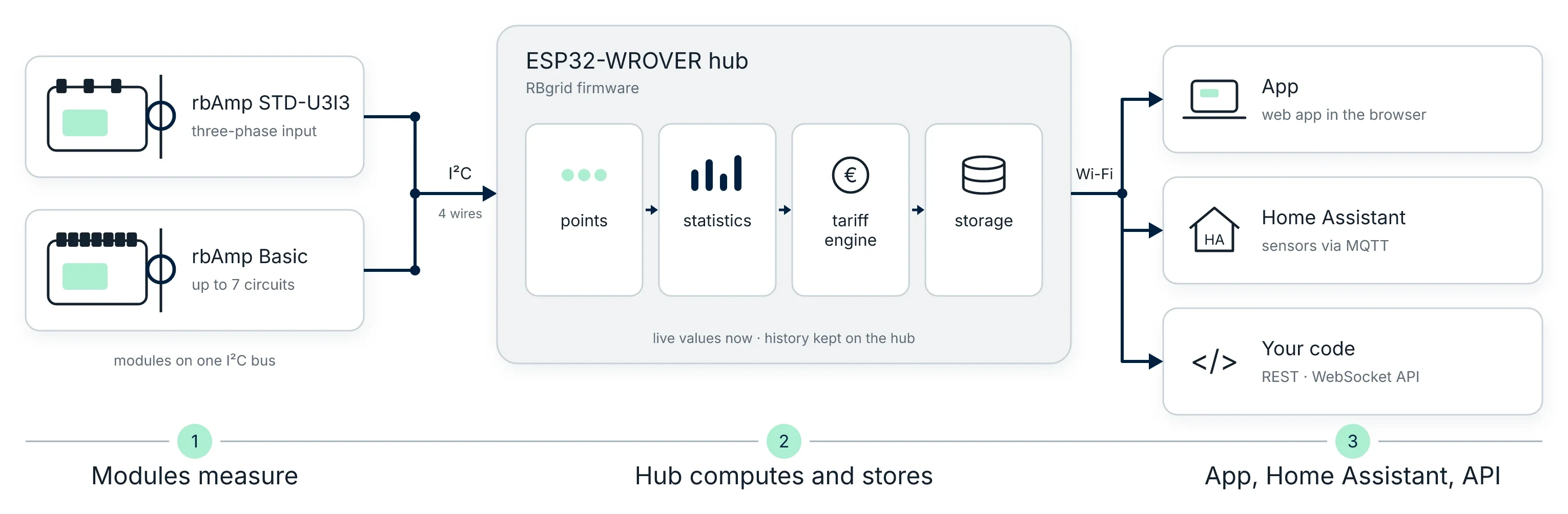
rbAmp modules clip onto your existing wiring and measure each circuit. An ESP32-WROVER hub reads them over I²C, applies your tariff, keeps the history and serves the app — all on your home network.
How it differs
Unlike most plug-in monitors: your real tariff (zones, weekends, VAT), up to 12 points with history on one hub, history kept on the device, keeps measuring and storing with the internet down.
Unlike a Home Assistant build: no server to run — and if you do run HA, the hub plugs into it.
Licence
- RBgrid
RBgrid firmware is source-available under the PolyForm Noncommercial 1.0.0 licence — free to use, modify and build for personal and non-commercial use.
Commercial use requires a licence — contact info@rbamp.com. This is not an OSI "open source" licence.
- rbAmp
The rbAmp measurement libraries are a separate product under the MIT licence.
Built on rbAmp modules
Measurement comes from rbAmp I²C modules — a separate product. The ESP32 hub collects, computes and stores; the rbAmp modules are the supported measurement path.
RBgrid is developed by the rbAmp team; module sales fund the work. The firmware carries no ads and no telemetry to us.