Your hub measures. Your AI assistant asks. You decide.
Set up your RBgrid hub by talking to it, then ask what anything cost. The figures come from the hub. The AI assistant is the one you already use.
Free firmware for personal use · No cloud of ours · No subscription of ours · Runs on your own network
Connect an AI assistant See it on the demo house New to RBgrid? Start here.
the same app, filled with a sample home's data
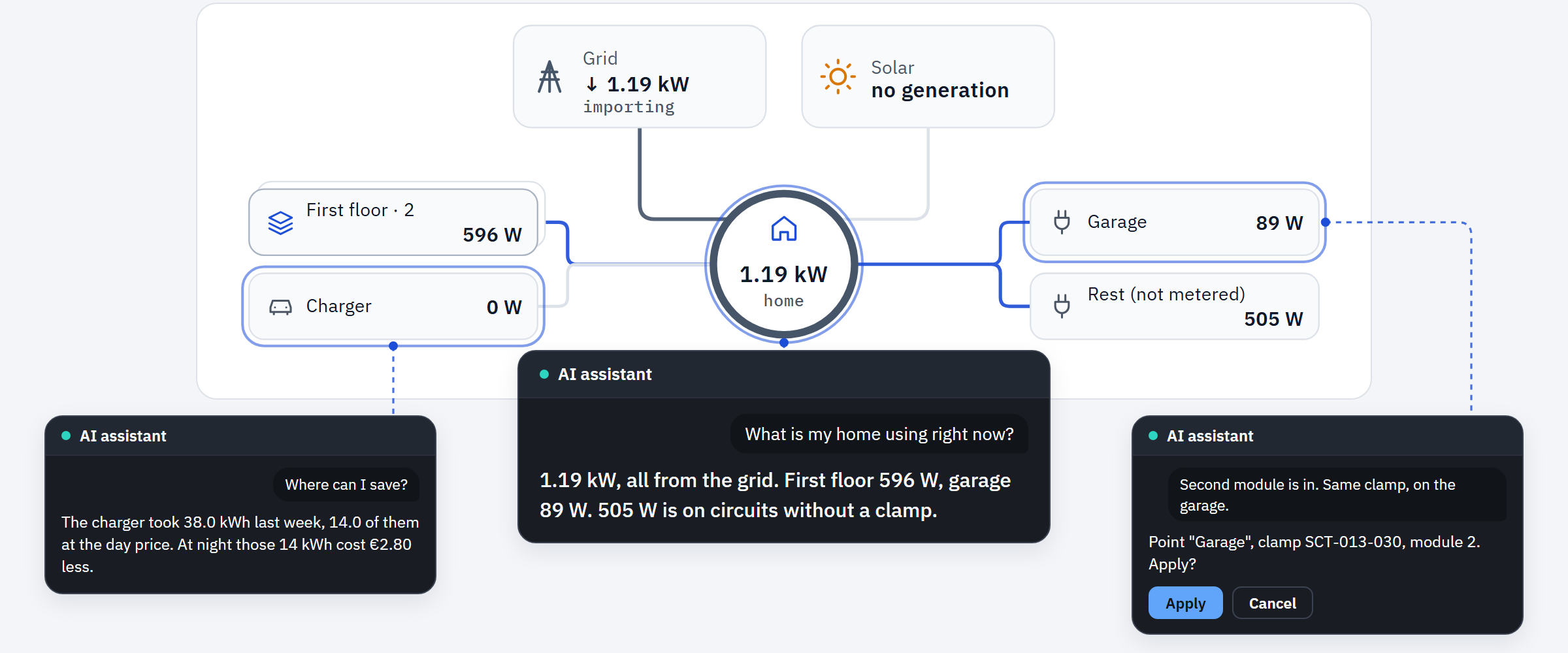
Ask, and get a number
"What did the kitchen cost last week?"
kWh and the amount, by the tariff you set on the hub.
"I'm switching the kettle on and off — which point sees it?"
The name of the point whose current moved with you.
"Set the night rate to 0.15 from 23:00 to 07:00."
The exact change, field by field, and "apply?"
Every number in those answers is one the hub measured and priced. The AI assistant turns your question into the right request, and the answer into a sentence.
Four things you stop doing
Hunting through menus
Say what you want. The hub tells your AI assistant what each setting is, so you never have to find where it lives.
"Rename point 3 to Heat pump."
Reading charts
The hub keeps every hour: energy, cost by your tariff, one period against another. Ask in words, get the answer in words.
"Where did my money go last month?"
Filling in forms
Modules, addresses, points, names, clamp models, the tariff: all of it is set while you talk.
"Second module is in. Same clamp, on the water heater."
Guessing whether it is right
The hub checks its own installation: modules answering, points attached, no address clashes, clock and time zone set.
"Check my installation."
A new hub, set up in one conversation
You work with your hands. It works with the hub.
Connect one module.
"First one is connected."
Say which clamp is on it.
"SCT-013-030, on the water heater."
Agree to the tariff it proposes.
day 0.30 → 0.35 · night 0.12 → 0.15
Ask your first question.
"0.21 kWh, 0.07 EUR at your day price."
The whole session, line by line
Photographs and screenshots of the install are being made. Until they are here, every step above is written out in words in the guide below — including the one menu path that actually accepts the file.
What it actually looks like
You: Connect to my RBgrid hub at http://192.168.1.50. I want you to be able to change settings too.
Assistant: I've started a pairing and asked for read and config access. The hub is now showing a 6-digit code on its AI assistants page. It is good for 10 minutes. What is the code?
You: 504453
Assistant: Paired. Please quit the app completely and open it again, so the hub's tools load.
You: Done, restarted.
Assistant: I can see the hub: firmware v1.3.0, no modules, no points yet. Let's add modules one at a time. Every module ships with the same address, so connect only the first one and tell me when it's in.
You: First one is connected.
Assistant: Found it on bus 0 at the factory address 0x50. I've moved it to 0x51, so the next module can use 0x50 without a conflict. It has one current input and a voltage input. The hub can't detect the clamp, so I need it from you: which clamp is on I0, and what is it measuring?
You: SCT-013-100, on the incoming line from the meter.
Assistant: That's your supply, so I've moved the hub's main supply point onto this input rather than making a new one — a hub has exactly one, and it was waiting for a clamp. Set its clamp to SCT-013-100 and named it "Main supply". Live reading: 229.8 V, 0.94 A, 198 W. Connect the next module when you're ready.
You: Second one is in, SCT-013-030, on the water heater.
Assistant: Found it at 0x50, moved it to 0x52, created the point "Water heater" as a load. It reads 0 A right now.
You: It's off. Now set my tariff: 0.35 by day, 0.15 at night from 23:00 to 07:00.
Assistant: Here is the exact change I would make — day price 0.30 → 0.35, night price 0.12 → 0.15 EUR/kWh, night window 23:00–07:00 unchanged. One warning from the hub: its time zone is not set, so "night" is counted in UTC. Apply the tariff?
You: Yes. And fix the time zone too — Europe/Berlin.
Assistant: Tariff applied; the hub kept the previous version, so you can restore it. Time zone (not set) → Europe/Berlin. Apply?
You: Yes.
Assistant: Applied. Installation check: two modules, two points, no address conflicts, clock and time zone set. Nothing left open.
You: How much did the house use in the last hour?
Assistant: 0.21 kWh, which is 0.07 EUR at your day price. Energy for the current hour is updated every 15 minutes, so the last few minutes may not be in yet.
A real session, shortened but not smoothed. The restart, the clamp the hub cannot identify by itself, and the time-zone warning are all in it because they all happened. On a hub you set up today, live power answers at once and money needs the hub's first stored records — so ask for watts on the first evening and for money the next day.
Where the money actually goes
You: My bill is higher than last year and I don't know why. Where is the money going?
Assistant: I compared the last 30 days with the same 30 days a year ago, from your hub's records.
| last year | this year | change | |
|---|---|---|---|
| Main supply, kWh | 356 | 412 | +56 |
| Cost, EUR | 109.80 | 127.40 | +17.60 |
Where the extra 56 kWh came from:
| Water heater | 112 -> 148 kWh | (+36) |
|---|---|---|
| Kitchen | 58 -> 61 kWh | (+3) |
| Washing machine | 23 -> 24 kWh | (+1) |
| Everything else | 163 -> 179 kWh | (+16) |
Two thirds of the increase is the water heater. Shall I look closer?
You: Yes. But it was colder this November, maybe that's all it is?
Assistant: Partly. This is from outside the hub: a public weather archive puts this November about 2 °C colder than last. Colder inlet water makes a heater work more, but that usually explains a few percent, not a third.
The hub shows something weather does not explain. Between 01:00 and 05:00, when nobody uses hot water, the heater used 0.31 kWh a night two months ago and 0.52 kWh now. That is energy spent only on keeping the tank hot, and it has grown by two thirds — inside eight weeks, which no change of season accounts for.
I can't see inside the heater, so these are things to check, not a diagnosis:
- The thermostat setting. Has anyone turned it up?
- A dripping hot tap or relief valve. Hot water leaving the tank all night looks exactly like this.
- Insulation and limescale. If the tank has not been serviced for years, descaling it and checking the element is due anyway.
The extra costs you about 11 EUR a month at the moment.
You: It hasn't been serviced in four years. I'll book it. What else?
Assistant: Three things you would not see on a chart.
1. When the heater runs. Of its 148 kWh, 96 fall in day hours at 0.35 EUR. If it has a timer and the tank lasts you through the day, heating at night at 0.15 EUR saves about 19 EUR a month, roughly 230 EUR a year.
2. When you wash. About 20 of the washing machine's 24 kWh fall between 18:00 and 21:00. Starting it after 23:00 saves about 4 EUR a month, 48 EUR a year.
3. What never switches off. In the quietest night hours your main supply still reads 0.24 kWh per hour. The heater and the kitchen account for 0.17 of it. The other 0.07 kWh is on no measured point: about 70 W, every hour of the year.
I can trust a figure this small because your main supply is on an STD-UI1 module. It notices that something is drawing current from 0.8 mA — above its own noise, which is 0.2 to 0.35 mA — and it counts energy from 4.8 mA. A Basic module states its accuracy from 5 % of the clamp's rating: on an SCT-013-030 that is 1.5 A. This night floor is about 0.3 A — roughly 1 % of that rating, below the range a Basic with a 30 A clamp states accuracy for. On this hub it is a measurement.
You: 70 watts is nothing.
Assistant: Per hour, yes. Over a year it is about 610 kWh, and at your tariff about 174 EUR. Chargers, standby electronics, a router, anything with a power brick.
One more detail, and here the hub's own limit shapes what I can say. Hourly records go back 60 days, so I can tell you this 0.07 has held steady for the last two months — and I cannot see from hourly records when it started. For older ground I have 400 days of daily totals, and yours have been drifting up since the spring. A daily total includes the daytime, so it cannot prove the night floor rose; it is consistent with something that runs around the clock. If you want the month it changed, switch the suspect off for a night and I will have the answer tomorrow.
You: The aquarium. And a second TV box. Can you tell which is which?
Assistant: Nothing measures them separately, but the STD-UI1 on your main supply is sensitive enough to see each one go. Pick a quiet moment, switch the TV box off at the wall and tell me. I'll read the live current before and after: even a 5 W standby is about 20 mA, well above the 4.8 mA where it starts counting energy.
Do the same with anything else you suspect, one device at a time. That is how you find the vampires without buying a meter for every socket.
You: TV box is off.
Assistant: Main supply dropped by 31 mA, about 7 W. Left on all year, that box costs you about 61 kWh, roughly 17 EUR, for doing nothing.
You: Deal. What should I do first?
Assistant: By what it is worth in a year, from your own figures:
| Heater on night rate (if the tank allows) | ~230 EUR |
|---|---|
| Heater service, if the night loss goes back | ~130 EUR |
| Standby, if you cut half of it | ~85 EUR |
| Washing after 23:00 | ~48 EUR |
One thing from outside the hub again: seasonal outlooks point to a colder winter than last, and outlooks are often wrong. If it holds, the heater's share will grow, which is one more reason to start there. The amounts above are estimates from one month, so ask me again in a month and I'll show what actually changed.
Every figure here comes from the hub; everything else is named as outside it. The weather archive, the seasonal outlook and the possible causes inside the heater are all labelled as such, because the hub measures electricity and nothing else. The amounts are one month's estimates, and the hub's own limits are stated where they bite: hourly records go back 60 days, daily totals 400.
You stay in charge
- A settings change is shown to you in full, old values and new, and is written only after you agree.
- The hub keeps earlier versions, and one button puts one back.
- One switch makes the hub read-only for every AI assistant at once.
- The hub logs every call: what was asked and what was done.
Hardware steps you ask for, such as adding a module or creating a point, are done at once. Settings are the ones that wait for you.
Why it is built this way. The hub is an instrument: it measures, prices, and gives the same number for the same question. An AI assistant is a language model: it understands what you asked and explains what came back. So the numbers you act on are measured, and changes wait for your word.
Where your readings go
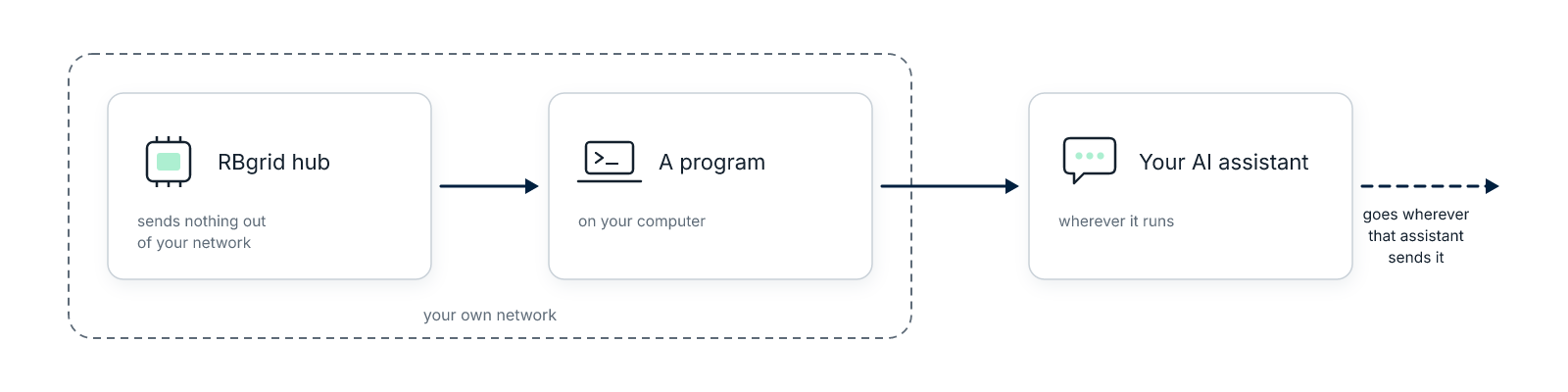
The hub answers on your own network and sends nothing out of it. Your AI assistant is a separate program: what it reads from the hub goes wherever that assistant sends it. If it runs in the cloud, your readings go to its service — the hub has no say in that. Pick the assistant you are willing to show your data to.
What you need
- An RBgrid hub on firmware 1.3.0.
- A computer on the same network, switched on while you are asking.
- An AI assistant app that can run a local MCP server. We have walked this by hand with Claude Desktop on Windows.
Good to know before you start
- It runs from a desktop or a laptop today.
- For energy and cost, the smallest period it can answer about is an hour.
- Spotting unusual readings starts once the hub has enough history to compare against.
- An AI assistant works on the hub's settings: what is measured, what it is called, what it costs. Your circuits stay with your own switchgear.
Next to Home Assistant, not instead of it
Home Assistant shows your circuits as sensors on a dashboard. An AI assistant answers questions about them in words and changes the hub's settings when you ask.
If you only want an AI assistant to read those sensors, Home Assistant's own MCP server already does that. Cost by your tariff, the hub's checks and settings changes come through a pairing with the hub.
FAQ
Does RBgrid run a cloud for this?
No. There is no service of ours between you and the hub, and no subscription of ours.
Which AI assistants work?
Any whose app can run a local MCP server. The ones we have tested are listed in the documentation, each with the date. Where an AI assistant runs
Can it break my setup?
Settings changes are shown in full before anything is written, and the hub keeps the version it replaced. Hardware steps are done at once and are undone by the opposite step. One exception: deleting a point also clears what it recorded.
Does it see my data?
The hub sends nothing out of your network. What your AI assistant reads goes wherever that assistant sends it.
Do I need Home Assistant?
No. They work side by side, and neither needs the other.
What does it cost?
The firmware is free for personal, non-commercial use. The AI assistant is yours, on its own terms.
Does it work in my language?
Yes. Ask in your own language, and your points keep the names you gave them. The app and this site are translated too; the written guides are in English.
Ask your energy meter.
- AI assistants
- Set up a hub by talking to it
- Connect an AI assistant
- Where an AI assistant runs
- What an AI assistant reads and changes
- Where to buy modules
On GitHub
The firmware, the bridge and the same guide live in the project's repository.