System Settings Page
Overview
The System Settings page is designed for basic configuration of the RBgrid electrical power measurement device. Here you can configure core system parameters, device identification, logging, and startup behavior.
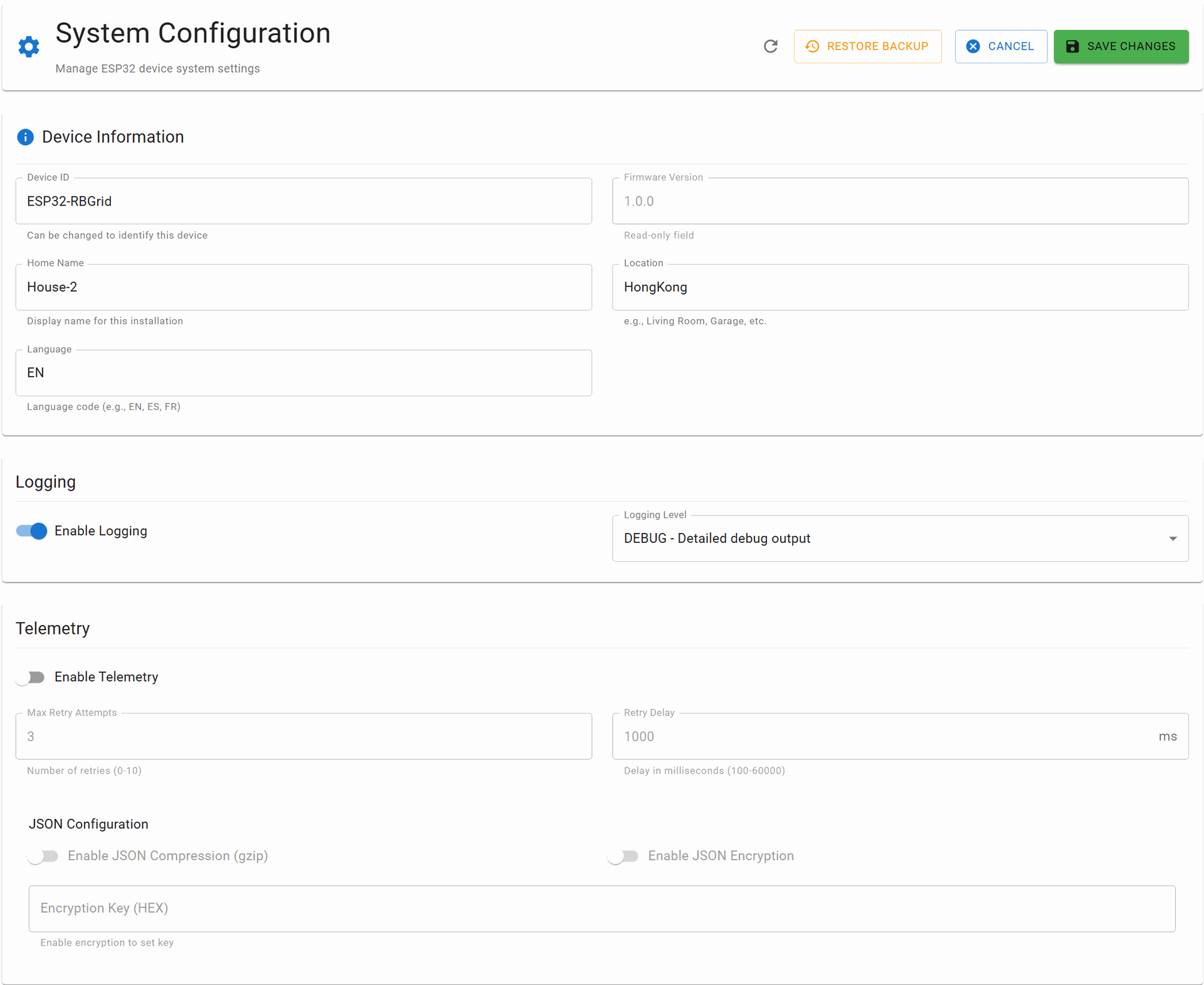

Settings Edit Process
Activating Edit Mode
- Click the EDIT CONFIGURATION button to enter edit mode
- All fields will become editable
- Make necessary changes to the parameters
Saving Changes
- After making changes, click the SAVE button
- The system will offer to perform a software reboot of the device
- Action options:
- Reboot now - immediate activation of settings
- Postpone reboot - continue configuring other parameters with subsequent unified reboot
⚠️ IMPORTANT: A connected Memory Storage module is required to save settings. Without this module, settings will not be saved after device reboot.
Settings Parameters
Device Information
version
- Type: String (read-only)
- Description: Device firmware version
-
Example:
1.0.0
device_id
- Type: String
- Description: Unique device identifier in the system
-
Example:
ESP32-RBGrid - Recommendations: Use a clear name to identify the device in RBgrid-NOW network, for MQTT telemetry, JSON
Location Identification
home_name
- Type: String
- Description: Name of the object/house/building where the device is installed
-
Example:
House-2 - Usage: Used for device grouping and in reports
location
- Type: String
- Description: Geographic location, locale, or installation address
-
Example:
HongKong - Usage: Helps identify the device when remotely managing a group of devices
Regional Settings
language
- Type: String (ISO 639-1 language code)
- Description: Device interface language
-
Available values:
EN,DE,RU,ES,FR,CN -
Default:
EN - Usage: Language selection for web-app interface, logging, alerts
Logging Settings
logging_level
- Type: Number (0-4)
- Description: System log detail level
- Values:
-
0- OFF (logging disabled) -
1- ERROR (critical errors only) -
2- WARNING (warnings and errors) -
3- INFO (informational messages) -
4- DEBUG (full debug information) - Recommendation: Use level 3 for normal operation
enable_logging
- Type: Boolean
- Description: Global enable/disable of logging system
-
Default:
true
Telemetry and Monitoring
enable_telemetry
- Type: Boolean
- Description: Send diagnostic data to remote server
-
Default:
false - Note: When enabled, the device will send operational statistics to configured MQTT brokers or addresses via HTTP, Websocket. Configure on the Telemetry page.
Network Parameters
max_retry_attempts
- Type: Number
- Description: Maximum number of retry attempts on network failures
- Range: 1-10
-
Default:
3
retry_delay_ms
- Type: Number
- Description: Delay between retry attempts (milliseconds)
- Range: 100-10000
-
Default:
1000 - Recommendation: Increase value for unstable networks
Data Transfer Optimization
enable_json_compression
- Type: Boolean
- Description: Compress JSON data during network transfer
-
Default:
false - Advantages: Reduces amount of transmitted data
- Disadvantages: Increases processor load
enable_encryption
- Type: Boolean
- Description: Encrypt data during transmission
-
Default:
false - Important: Recommended to enable when working through public networks. Increases processor load
System Behavior
auto_start_measurements
- Type: Boolean
- Description: Automatically start measurements when device powers on
-
Default:
true -
Usage: When
false, measurements must be started manually via web interface
Requirements and Limitations
- Memory Module: Memory Storage module is required for permanent settings storage
- Reboot: All settings require a reboot to apply
- Validation: System automatically checks the correctness of entered values
- Backup: System saves previous configuration to backup file. Previous settings can be rolled back
Troubleshooting
Settings Not Saving
- Check Memory Storage module connection
- Ensure the save process completes correctly
Device Not Responding After Changing Settings
- Perform hardware reboot of the device
- Reset to factory settings using physical RESET button (hold for 10 seconds)
High Processor Load
- Reduce logging level
- Disable JSON compression on weak processor
- Disable telemetry if not being used