Tariff Configuration
Overview
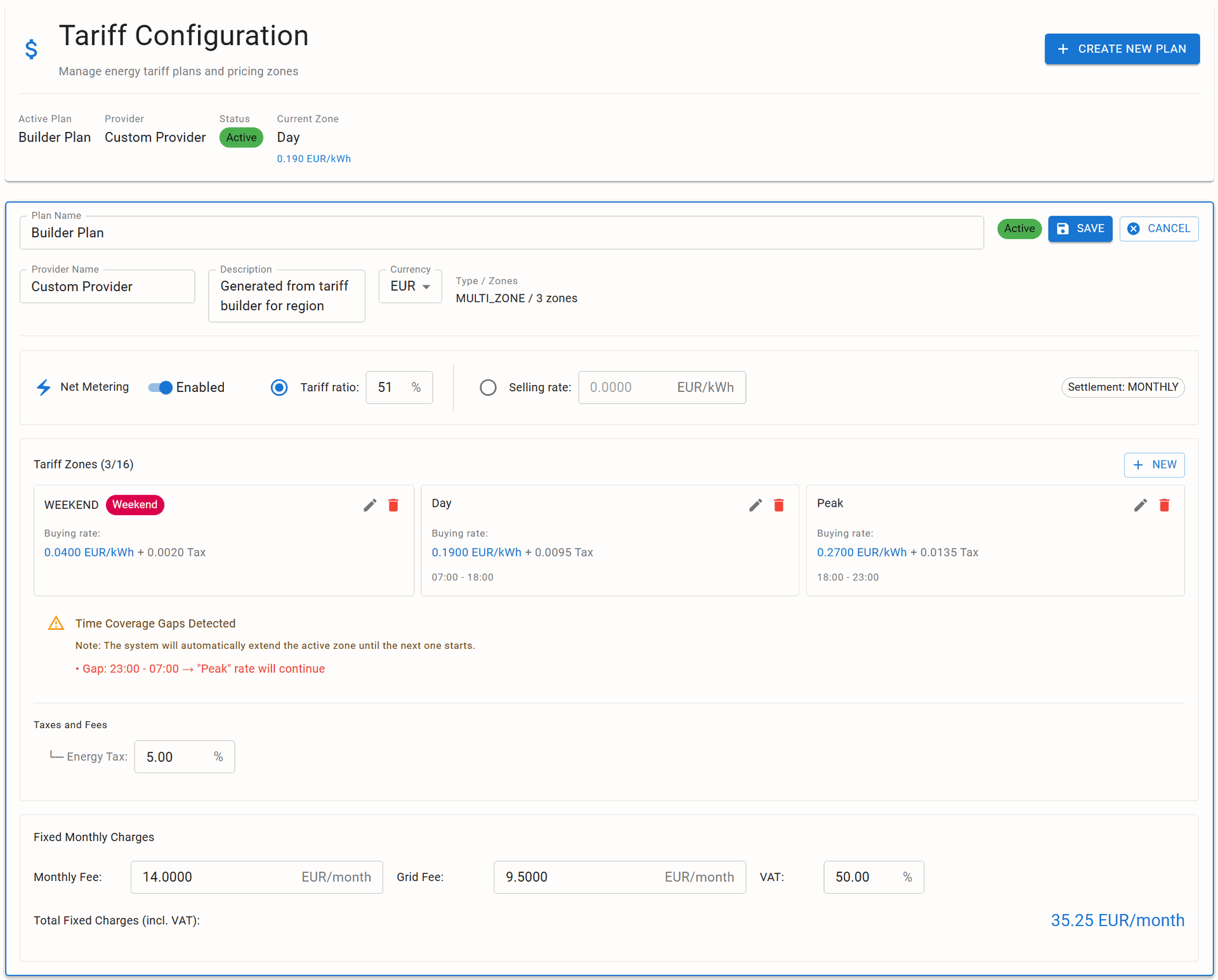
The Tariff Configuration page manages electricity pricing plans, time-of-use zones, and economic calculations for the RBgrid power measurement system. This critical component enables accurate cost tracking for consumption, savings calculation from internal generation, and revenue accounting from grid feed-in.
Purpose and Importance
Tariff configuration is essential for:
- Economic Analysis: Calculate actual electricity costs per device and total system
- Internal Generation Savings: Quantify monetary savings from solar/battery usage
- Grid Feed-in Revenue: Track income from selling excess power back to grid
- Device-level Costing: Determine operating costs for individual loads
- Budget Planning: Project monthly and annual electricity expenses
- ROI Calculations: Evaluate return on investment for renewable energy systems
- Time-of-Use Optimization: Identify opportunities to shift loads to cheaper periods
Active Plan Header Section
Displays the currently active tariff plan summary for quick reference.
Header Information
Plan Name
- Type: String
- Description: User-defined name for the tariff plan
- Example:
Builder Plan,Time-of-Use Residential,Commercial Three-Phase
Provider Name
- Type: String
- Description: Electricity provider or utility company
- Example:
Local Provider,National Grid,City Power Company
Status
- Values:
Active- Currently applied to calculationsInactive- Saved but not in useDraft- Being edited, not yet activated
Current Zone
- Description: Active tariff zone at current time
- Format:
[Zone Name] = [Rate] [Currency]/kWh - Example:
Day = 0.190 EUR/kWh - Updates: Real-time based on system time
Tariff Plan Configuration
Plan Management
Each tariff plan contains complete pricing structure including zones, taxes, and fees.
Plan Controls
- EDIT PLAN: Modify existing tariff configuration
- ACTIVATE: Set as current active plan
- DUPLICATE: Create copy for modification
- DELETE: Remove inactive plan
- IMPORT/EXPORT: Share configurations via JSON
Net Metering Configuration
Manages bidirectional energy flow accounting for prosumer scenarios (consumer + producer).
Enable Net Metering
- Type: Toggle switch
- Default:
Disabled - Description: Activate bidirectional metering for Main Supply unit
- Requirement: Main Supply unit must be configured
Feed-in Calculation Method
- Type: Radio selection
- Options:
1. Tariff Ratio
- Description: Feed-in rate as percentage of buying rate
- Range: 0-100%
- Example: 51% means selling at half the buying price
- Formula: Selling Rate = Current Buying Rate × Ratio
- Use Case: Dynamic pricing following market rates
2. Fixed Selling Rate
- Description: Constant feed-in tariff regardless of time
- Format: 0.0000 [Currency]/kWh
- Example: 0.0850 EUR/kWh
- Use Case: Fixed feed-in tariff contracts
Net Metering Behavior
When energy flows FROM grid → Apply current buying rate
When energy flows TO grid → Apply selling rate (ratio or fixed)
Net calculation per billing period → (Consumption × Buy Rate) - (Export × Sell Rate)
Tariff Zones Configuration
Time-based pricing zones for different periods of the day or week.
Zone Capacity
- Maximum Zones: 16
- Minimum Zones: 1 (flat rate)
- Types: Time-based or weekend/holiday
Zone Parameters
Zone Name
- Type: String
- Examples:
Peak,Off-Peak,Day,Night,WEEKEND - Purpose: Identify zone in reports and UI
Zone Type
- Options:
Time Range- Specific hours (e.g., 07:00-18:00)Weekend- All day Saturday/SundayHoliday- Configured holiday datesSpecial Event- Utility-defined special rates
Buying Rate
- Type: Decimal
- Format: 0.0000 [Currency]/kWh
- Description: Energy purchase price for this zone
- Range: 0.0001 - 99.9999
Tax Component
- Type: Decimal
- Format: 0.0000 [Currency]/kWh
- Description: Additional tax per kWh
- Calculation: Added to base rate
Time Range (for time-based zones)
- Format: HH:MM - HH:MM (24-hour)
- Example:
18:00 - 23:00 - Validation: No overlapping allowed
Days Active (optional)
- Type: Day selection
- Options: Monday-Sunday
- Default: All weekdays
Zone Examples
Example 1: Simple Day/Night
Zone 1: "Day" | 06:00-22:00 | 0.1900 EUR/kWh
Zone 2: "Night" | 22:00-06:00 | 0.0950 EUR/kWh
Example 2: Complex Time-of-Use
Zone 1: "Night" | 00:00-07:00 | 0.0800 EUR/kWh
Zone 2: "Day" | 07:00-18:00 | 0.1900 EUR/kWh
Zone 3: "Peak" | 18:00-23:00 | 0.2700 EUR/kWh
Zone 4: "Late Night" | 23:00-00:00 | 0.1200 EUR/kWh
Zone 5: "WEEKEND" | Weekend | 0.0400 EUR/kWh
Time Coverage Validation
The system automatically validates time zone coverage and handles gaps.
Coverage Warning
⚠️ Time Coverage Gaps Detected
The system will automatically extend the active zone until the next one starts.

Example:
• Gap: 23:00 - 07:00 → "Peak" rate will continue
Auto-Extension Rules
- If gap exists between zones → Previous zone extends
- If no zone at 00:00 → Last zone of day continues
- Weekend zones override time-based zones
- Holiday zones override all other zones
Best Practice
Configure zones to cover full 24 hours to avoid confusion:
- Start first zone at 00:00
- End last zone at 23:59 or 00:00
- Verify no gaps in coverage
Taxes and Fees
Additional charges applied to energy consumption.
Energy Tax
- Type: Percentage
- Range: 0.00% - 99.99%
- Description: Tax on energy consumption
- Application: Applied to base rate
- Formula:
Total Rate = Base Rate × (1 + Tax%) - Example: 5% tax on 0.19 EUR → 0.1995 EUR/kWh
Additional Fees
- Carbon Tax: Fixed or percentage per kWh
- Renewable Energy Levy: Support for green energy
- Transmission Charges: Grid usage fees
- Distribution Fees: Local network charges
Fixed Monthly Charges
Recurring charges independent of consumption.
Monthly Fee
- Type: Decimal
- Format: 0.0000 [Currency]/month
- Description: Basic service charge
- Example:
14.00 EUR/month
Grid Fee
- Type: Decimal
- Format: 0.0000 [Currency]/month
- Description: Grid connection and maintenance
- Example:
9.50 EUR/month
VAT (Value Added Tax)
- Type: Percentage
- Range: 0.00% - 99.99%
- Description: Tax on fixed charges
- Application: Applied to sum of fees
Total Fixed Charges
- Calculation:
(Monthly Fee + Grid Fee) × (1 + VAT%) - Display: Automatically calculated with VAT
- Example:
(14.00 + 9.50) × 1.20 = 28.20 EUR/month
Economic Calculations
Consumption Cost
Hourly Cost = Energy (kWh) × Current Zone Rate × (1 + Tax%)
Daily Cost = Σ(Hourly Costs) + (Fixed Charges / 30)
Monthly Cost = Σ(Daily Costs) + Fixed Monthly Charges
Generation Savings
Self-Consumption Savings = Generated Energy × Current Buy Rate
Feed-in Revenue = Exported Energy × Selling Rate
Total Benefit = Savings + Revenue
Device-Level Costing
Device Cost = Device Energy × Zone Rate × Time in Zone
Device Daily = Σ(Device Hourly Costs)
Device Monthly = Σ(Device Daily) × Days
Return on Investment
Monthly Savings = Self-Consumption Savings + Feed-in Revenue - System Cost
Payback Period = Initial Investment / Monthly Savings
Annual ROI = (Annual Savings / Investment) × 100%
Best Practices
Zone Configuration
- Cover Full 24 Hours: Avoid gaps in time coverage
- Align with Utility: Match zones to provider's schedule
- Weekend Rates: Configure if different from weekdays
- Seasonal Adjustments: Update for summer/winter rates
Net Metering Setup
- Verify Contract: Ensure feed-in tariff matches utility agreement
- Regular Updates: Adjust rates when contracts change
- Monitor Ratios: Track if percentage-based rates remain favorable
Tax Configuration
- Include All Taxes: Energy tax, VAT, environmental levies
- Separate Components: Track different tax types for reporting
- Update Annually: Tax rates may change yearly
Multiple Plans
- Seasonal Plans: Different rates for summer/winter
- Contract Changes: Keep old plans for historical data
- Comparison: Maintain alternative plans for analysis
Integration with Other Systems
Statistics Module
- Applies tariff rates to consumption data
- Calculates costs per period
- Generates economic reports
Units Configuration
- Each unit's consumption priced individually
- Main Supply uses net metering rates
- Alternative Supply calculates savings
Time Configuration
- Critical for correct zone selection
- Timezone affects zone transitions
- Sync required for accurate billing
Telemetry
- Exports cost data with measurements
- Includes current rate in real-time data
- Sends billing period summaries
Troubleshooting
Incorrect Zone Applied
- Check: System time and timezone
- Verify: Zone time ranges have no gaps
- Review: Weekend/holiday overrides
Zero Cost Calculations
- Check: Tariff plan is activated
- Verify: Rates are configured (not 0.00)
- Ensure: Units have consumption data
Feed-in Not Calculating
- Check: Net metering enabled
- Verify: Main Supply configured
- Ensure: Bidirectional flow detected
Fixed Charges Missing
- Check: Monthly fees configured
- Verify: VAT percentage set
- Review: Billing period alignment