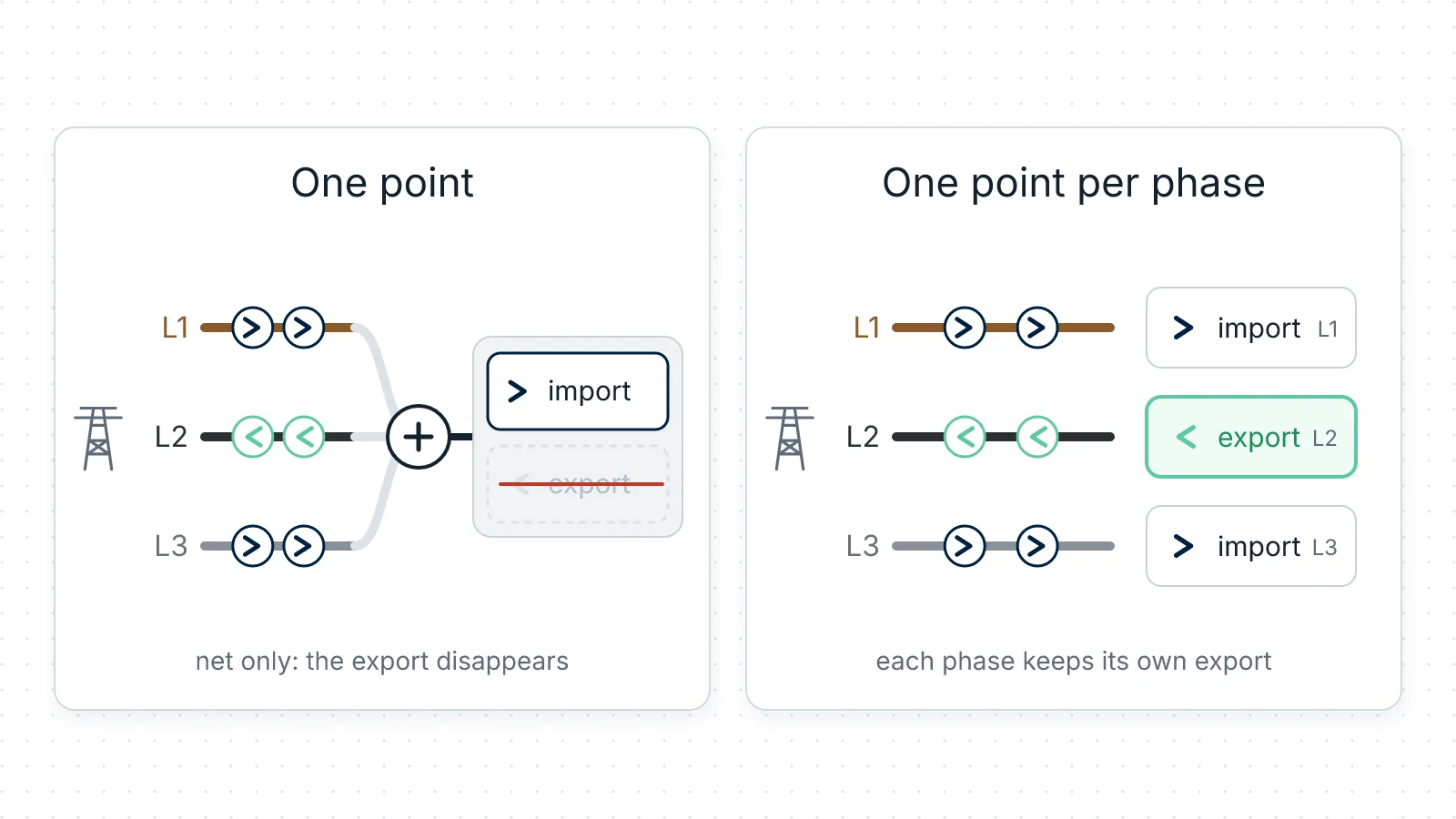
Your inverter says it sent 6 kWh back to the grid yesterday. RBgrid says you exported 0.3. Nothing is broken, and neither number is wrong — they are answers to different questions.
This is the one thing worth understanding about a three-phase supply before you trust an export figure.
Why the two numbers disagree
A three-phase house has three live conductors, and your solar inverter is probably on one of them. The rest of the house is spread across all three. RBgrid meters a supply like that with one three-phase module — an STD-U3I3, one clamp per conductor.
When RBgrid meters your supply as one point, that is exactly what it is: one point. Each quarter of an hour it records what the three phases came to together — the net. Energy flowing out on the phase with the inverter is cancelled by energy flowing in on the other two, and what gets stored is the difference.
So: your export is visible on a grouped point only if, in that quarter of an hour, it beat everything else the house was drawing.
That is also what a utility meter of that kind does, which is why this is not a bug to be fixed. If your supplier's meter nets the phases, the netted figure is the one you are billed on, and RBgrid agreeing with it is the point.
What the hub records instead
Illustrative, with round numbers — use your own:
Your inverter is on L2 and pushing out 2 kW. The kitchen and the office are on L1 drawing 0.9 kW, and the heat pump is on L3 drawing 0.8 kW. Net across the three: 2 − 1.7 = 0.3 kW going out. Hold that for a full quarter of an hour and what the hub stores is the net — 0.075 kWh of export — while your inverter's own app reports 0.5 kWh produced. Both are telling the truth.
Now someone starts the dishwasher on L1. For the whole of the next quarter-hour the house draws 2.1 kW against the inverter's 2 kW: the net turns inward, so that quarter stores 0.025 kWh of import and no export at all — while the inverter is still sending 2 kW out of the building.
The quarter is the unit, not the moment. Start the dishwasher halfway through one and what gets stored is the net of the whole quarter — the export from the first half and the import from the second, added together.
Over a sunny day this is not a rounding difference. It is most of your export, and it is invisible in the figure that your sell price gets applied to.
Measured, not inferred
On our bench supply we modelled this physically — real current flowing outward on one phase while the other two drew — and ran the same load twice, once with the input metered per phase and once as a single point:
| Metered as | What the hub stored |
|---|---|
| one point, phases netted | about 109 Wh imported, and no export at all |
| one point per phase | L1 92.0 Wh in · L2 73.5 Wh out · L3 91.9 Wh in |
Same wiring, same load, two metering modes. One of them records 73.5 Wh of export; the other records none — because 92.0 + 91.9 − 73.5 is still energy coming in. (The two runs were separate windows, so the totals don't agree to the watt-hour; the point is the shape, not the last digit.) The export didn't go anywhere. It was netted away before it was ever stored.
The choice: one point, or one per phase
From RBgrid v1.1.5 the same supply can be metered either way, and the module card says which mode it is in:
| The card says | What that means for export |
|---|---|
| "Input: one point for all three phases (phases netted)" | Export on one phase is offset by import on the others, each quarter-hour. One set of figures for the whole supply. |
| "Input: one point per phase" | Each phase keeps its own import and export. Nothing is offset between phases. Three sets of figures. |
Which one is right for you is your meter's behaviour, not a preference. A meter that nets the phases and a meter that counts each phase bill the same house differently, and the mode to choose is the one that matches the meter you are billed on.
And be clear about what switching does: it changes what you can see, not what you are paid.
- If your supplier's meter nets the phases, the netted figure is the one your money is calculated from. RBgrid agreeing with your statement is the useful outcome. Metering per phase then tells you where the energy went — worth having, but your payment doesn't move.
- If your supplier counts each phase separately, a netted point understates what you are owed, sometimes by most of it. That is when the mode is worth changing: otherwise your own records disagree with your statement and you have no way to check which is right.
Your supplier's terms, or the meter's own display, will tell you which of the two you have. Until you change it, a hub meters the supply as one point — that is where it starts, not a recommendation.
Switching is in the app — Points → the STD-U3I3 card carrying the input → the button for the other mode — and it applies after a restart. The clamps are already on all three conductors in either mode, so this is a change in software and nothing else: no rewiring, no panel. The steps, the exact confirmations and what happens to your data are in Sensors and modules.
For any work inside an electrical panel, call a qualified electrician.
What per-phase metering gives you
- Export on each phase, priced. Each phase point has its own import and export, so the energy your inverter sent out is counted where it happened rather than netted against the rest of the house.
- Its own history. Three points, three sets of stored records. The History page shows them separately — L1, L2 and L3 with their own charts, tables and CSV downloads.
- One figure for the supply as a whole, as well. From firmware v1.1.6 the hub serves the three phase points as one summed series, and the app reads it: the Overview's today-by-hour, "today vs yesterday", month-to-date and the forecast, and the Economics totals, all cover the whole supply again. You get the per-phase view and the household view. → What's new in v1.1.6
And one thing that does not change with the mode: the hub reports each phase's power with its direction in either mode. Even metered as one point, it shows the exporting phase as negative while the other two are positive — on the bench, L1 +502 W, L2 −401 W, L3 +502 W, live, at the same moment the stored figures were showing import alone. Where you read it: the Overview's Phases card, which draws an exporting phase as ↑ 401 W in the export colour, and the Per phase table on the input point's page, which writes the same figure as −401 W. What netting costs you is the stored energy and the money, not the live reading.
What it costs
- Three points instead of one. The hub keeps history for twelve measurement points, and a split input takes three of them. On a house with a lot of metered circuits, that is three slots you were perhaps spending elsewhere. → How many circuits can one hub handle?
- Going back is not free. Switching back to one point deletes the L2 and L3 points and erases their own records. Their totals move into the input, so the site's totals never go down, but the per-phase history is gone — download anything you need first. The app's confirmation says so, and names the points it will remove.
- Older firmware takes one supply point only. If you ever install firmware older than v1.1.5 on a hub whose input is metered per phase, switch it back to one point first.
What each zone pays for it
Pricing export is the same job in either mode, and it is worth checking after you switch, because this is where a wrong number is expensive rather than merely confusing.
Every tariff zone carries its own Sell price, and the hub values exported energy at the price of the zone it happened in. A rate that varies by time of day means each zone gets its own figure; a flat export rate means the same number in all of them. If your contract pays nothing for export, those fields belong at 0 — the hub prices what it is told to price.
The quarter-hour is the unit here too: each quarter is priced at the zone its midpoint falls in. A boundary on the hour or the quarter costs you nothing, because it lines up with the quarters themselves. A boundary at an odd minute does: if a zone starts at 07:10, the quarter running 07:00–07:15 has its midpoint at 07:07:30, so the whole of it — including the five minutes after 07:10 — is priced at the earlier zone. If your export rate steps at an awkward time of day, set your zone boundaries on the quarter where you can.
Net metering is a different kind of contract, not a switch for "do I get paid". It is the monthly kilowatt-hour credit, where a month's export is set against a month's import. Leave it off unless that is your contract; export is valued either way. → Tariffs: export valuation
Two things worth knowing once the prices are in:
- Import and export are never netted into one number. Energy in and its cost, energy out and its value, side by side. What your supplier actually settles depends on your contract, and the hub doesn't guess at it.
- A generation point is a different measurement from export. Export is what leaves at the supply; generation is what your inverter produces, measured on its own line. Most of a sunny day's production is used in the house and never reaches the meter. → Economics
The short version
If your three-phase supply is metered as one point, you are measuring the way a phase-netting meter measures — and if your inverter is on one phase, the stored export will usually be a fraction of what it produced. When your supplier nets the phases too, that is the right answer and nothing needs changing. When your supplier counts each phase, switch the input to one point per phase, so your own records and your statement describe the same thing — and keep in mind that it costs three of the hub's twelve history slots.