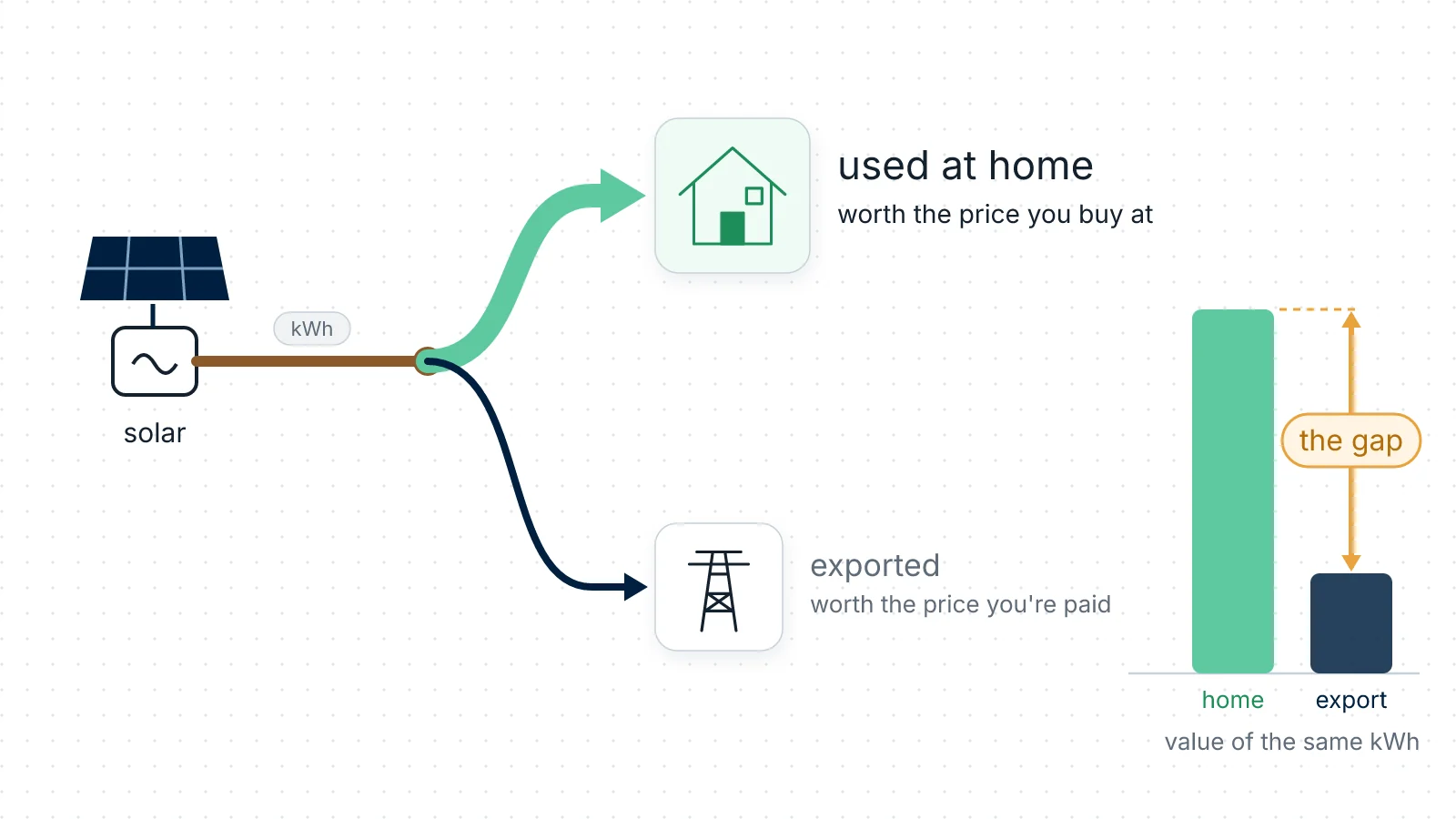
Your inverter app knows how many kilowatt-hours went out to the grid. Your supplier knows what it paid you, and tells you a quarter later. Nothing in between tells you the thing you actually want to know: what was that export worth at the hour it left, and would you have been better off using it?
That gap matters because the two prices are not the same number. You buy at one rate and you are paid at another, usually a much lower one — in the UK the rate you're paid is set by your supplier's Smart Export Guarantee (SEG) tariff. So a kilowatt-hour you use yourself is worth more than the same kilowatt-hour sold, and every hour the sun is out you are making that trade without seeing it.
RBgrid puts both prices on the hub, applies them to what it measures at your own supply, and shows export value next to import cost for any hour, day or month — in your own currency, computed on a small box in your fuse board with no account and no cloud service.
Look before you build: the finished thing is in the live demo — the Home with solar site, with sample data and no hardware needed. Every screenshot below is from it.
What you'll have at the end
- The gap between buying and selling, hour by hour — what a kilowatt-hour earns if it goes out against what it saves if you use it. This is the number your portal cannot show you, because it doesn't know your prices.
- Export valued in pounds at your export rate, measured at your own supply rather than modelled from your inverter's output.
- Import cost beside it, so the two are comparable at the same hour.
- How much of your generation you used yourself and how much went out — this one needs a second meter on the inverter line; see below.
- History on the hub: by hour for 60 days, by day for about 13 months, by month for 3 years, any of it downloadable as CSV.
Before you start
Hardware. Your supply must be measured by an rbAmp STD-UI1 on the incoming cable, because everything here rests on import and export being counted separately — a Basic module counts one direction only and would simply not see the export. For generation split from export, a second STD-UI1 on the inverter line. What the modules cost is on Hardware; the House that exports set is the one you want.
The hub is an ESP32-WROVER board that you flash yourself over USB — the firmware is free for personal, non-commercial use and its source is published. → Get started
If none of it is built yet, build it first: the full install for a house that exports covers both meters, the circuits and the panel drawing.
Safety. For any work inside an electrical panel, call a qualified electrician.
Scope, so you can tell whether this is your house: a single-phase supply, panels and an inverter, no battery. RBgrid has no battery accounting in v1.1.x. With a hybrid inverter, a meter on the inverter's AC line measures what crosses that line, which is not the same thing as what the panels made: those two differ whenever the battery is charging or discharging, and by how much is your inverter's behaviour rather than anything RBgrid can see. So read the generation figures as what came off the inverter, and don't expect them to separate battery charging from self-use. The supply-side numbers — import, export and their money, which is what this page is about — are measured at your incoming cable and are unaffected either way.
1. Put your plan on the hub
Open Tariffs. If you have no plan yet, build it first — your supplier's day and night prices, applied to every circuit walks through it — then come back here for the export half. → Tariffs
A zone is one named period with its own price: on a two-rate plan, "day" and "night" are your two zones. On a single flat rate, one zone covering the whole day.
Four things make a UK bill read differently from what the hub expects:
- Currency. It's a field on the plan — set it to GBP and every price and cost on the hub follows.
- Prices as the bill writes them. Leave Price as on the bill — incl. VAT switched on, which is how it arrives: you then type the unit rate straight off your bill, and the hub stores it net and adds VAT back when it computes. Nothing to divide by hand.
- Check the VAT field. A new hub starts at the factory example's 21 %, which is not a UK rate. Set it to the rate on your own bill. Leave it and every cost figure runs high — and you would blame your clamps long before you blamed this box.
- The standing charge does not go in at all. RBgrid's costs are energy-based: no fixed daily charge is included in any cost figure, and the editor has no field for one. So the month total here is your energy money, not your bill. Better to know it now than to spend an evening hunting the discrepancy.
The per-kWh fields — energy tax, grid fee, renewable levy — are for supplies that itemise such charges separately. A typical UK bill has a unit rate and a standing charge and nothing else, so you will probably leave them empty.
2. Put your export price in
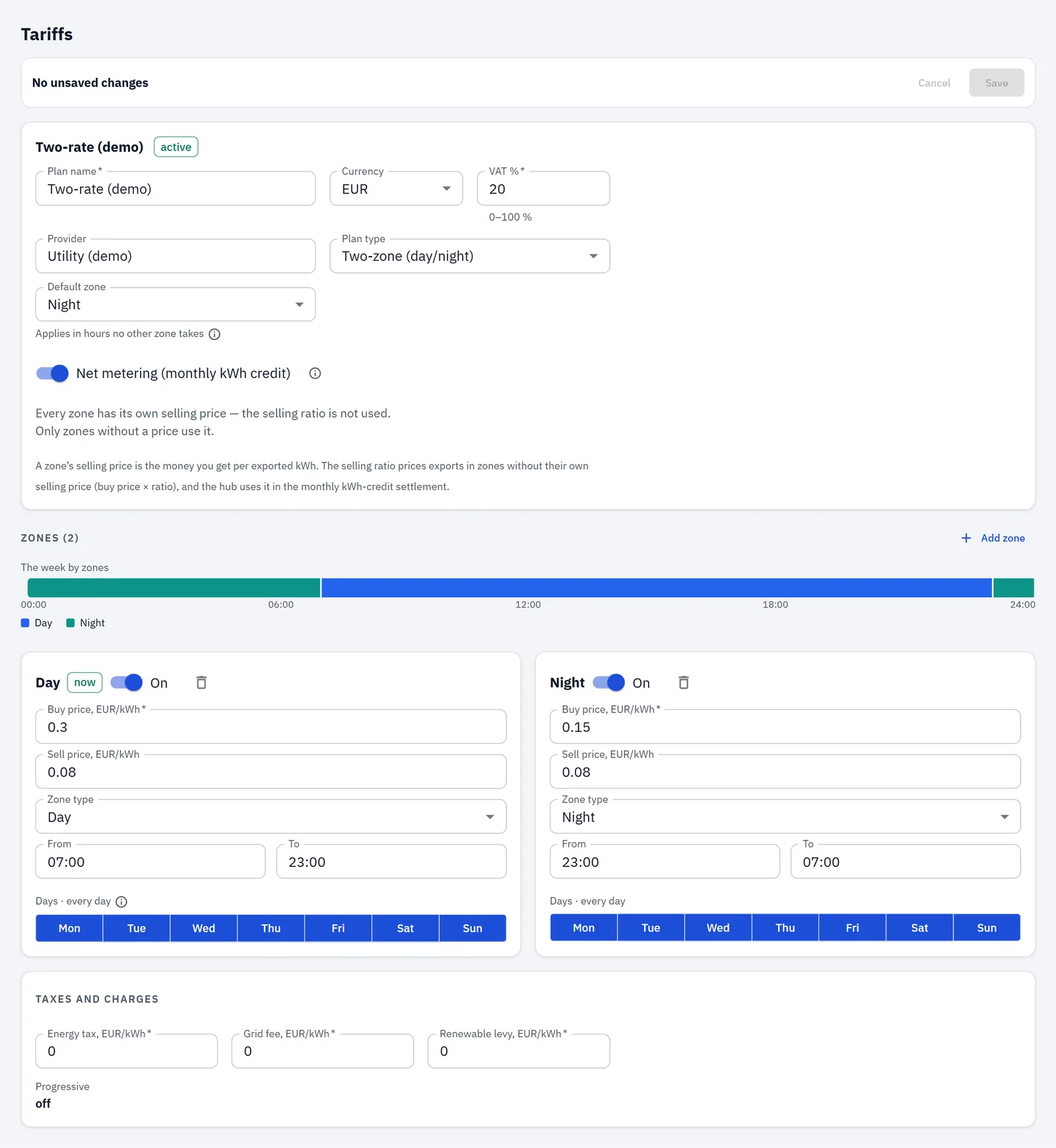
The sell price is what you are paid per exported kilowatt-hour. On a Smart Export Guarantee tariff that is your supplier's SEG rate — it's on your SEG tariff paperwork or in your supplier account, and whatever the number is, it goes here.
Two things about the field, and then the part people get wrong:
- A zone's sell-price field appears only on a zone that already has a buy price. Price the zone first, then the export.
- Fill the sell price in on every zone, not just the one you are looking at. Export is valued at the price of the zone the energy left in, so a zone you skip prices its exports at whatever it was left holding.
- Leave Net metering switched off. It is labelled Net metering (monthly kWh credit), and that is exactly what it is: a contract where a month's export is netted against a month's import and the balance carried as kilowatt-hours. A SEG tariff is not that — you are paid per exported kWh — so leave it off, as the app's own help says. Your export is still valued either way: that toggle has never controlled whether export is priced. Switching it on would only add a credit card in Economics describing a contract you don't have. On or off, no stored cost or energy figure changes.
On an older hub (app 1.1.4): the sell-price fields are hidden until Net metering is switched on — there, the toggle alone decides. Switch it on to reach the fields, fill them in, then switch it back off before you Save: the prices you typed are kept and used. Updating the hub removes the detour.
Then:
- A flat export rate — most SEG tariffs — means the same sell price in every zone. That isn't a workaround; it's what a flat rate is.
- A rate that varies by time of day — Octopus Flux, for example — means each zone its own price, the same way your import zones work.
- If your supplier pays nothing for export, set the sell price to 0. The page still earns its keep: it shows you what you are giving away, which is the strongest argument for using the surplus yourself.
- If you are paid on a deemed basis — an estimate rather than a meter reading — what you are paid won't move with these numbers at all. What you could save by using the surplus still will, and that is the larger half of the arithmetic below.
3. The gap that decides things
Once both prices are in, the hub can answer the question the portal can't.
A kilowatt-hour from your roof has two possible values: used in the house, it saves you the buy price of that zone; sent out, it earns you the sell price. The difference between them, times the surplus you are exporting right now, is what an hour of decision is worth.
The Insights card on the Overview states it as a line — the surplus going out, and the per-kilowatt-hour difference between buying and selling it, marked ≈ because it's the app's estimate at your current rates. A 3 kW surplus is worth three times what a 1 kW surplus is: the rate is per kilowatt-hour, the money is per hour.
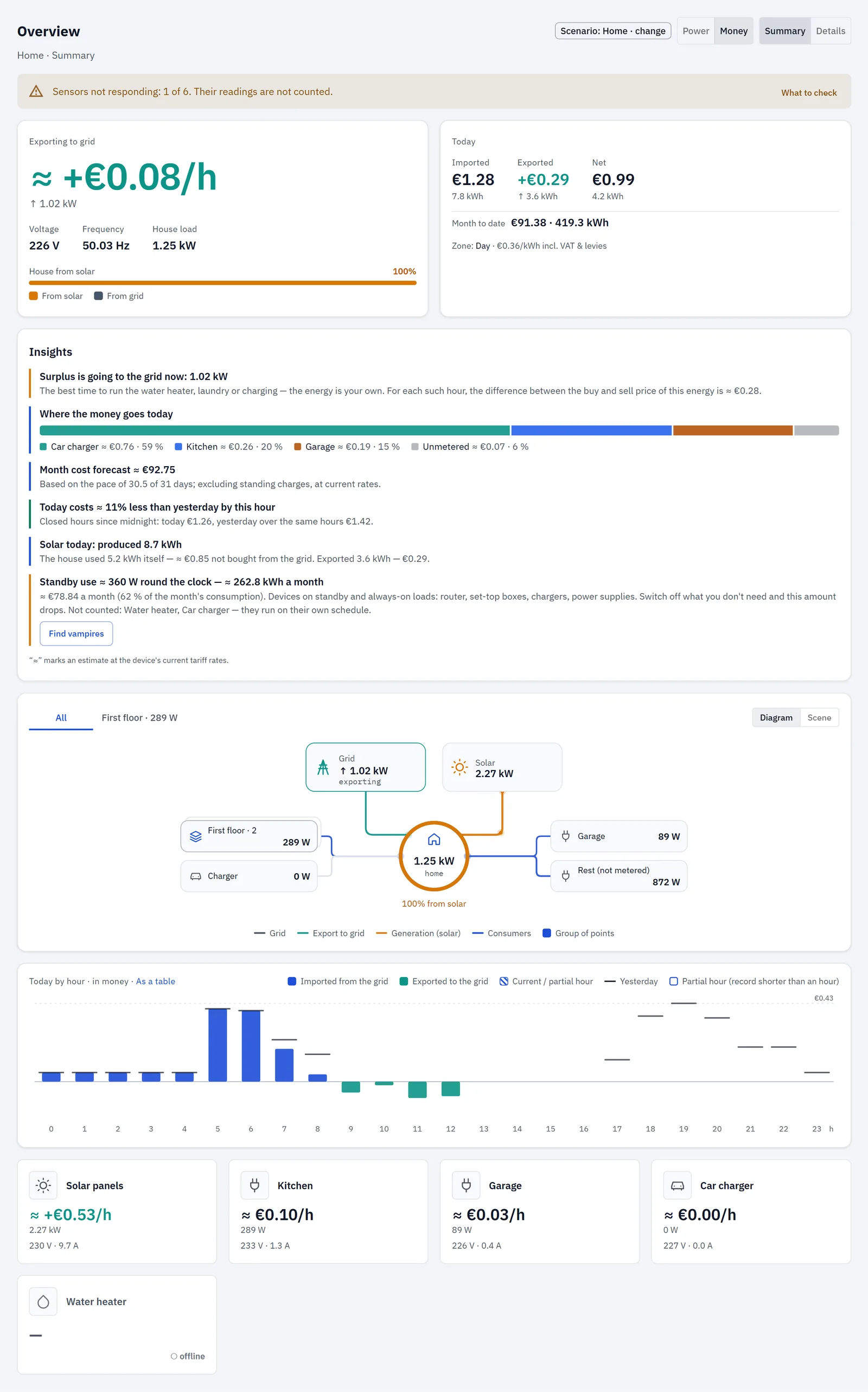
RBgrid does not act on this. It has no outputs and switches nothing: if you move the washing machine to noon, you move it. What the hub does is make the trade visible while you can still make it.
4. Where the money shows up
- Overview — the hero reads Exporting to grid when the supply reverses, and Today adds Exported and Net once energy has gone out. → The Overview
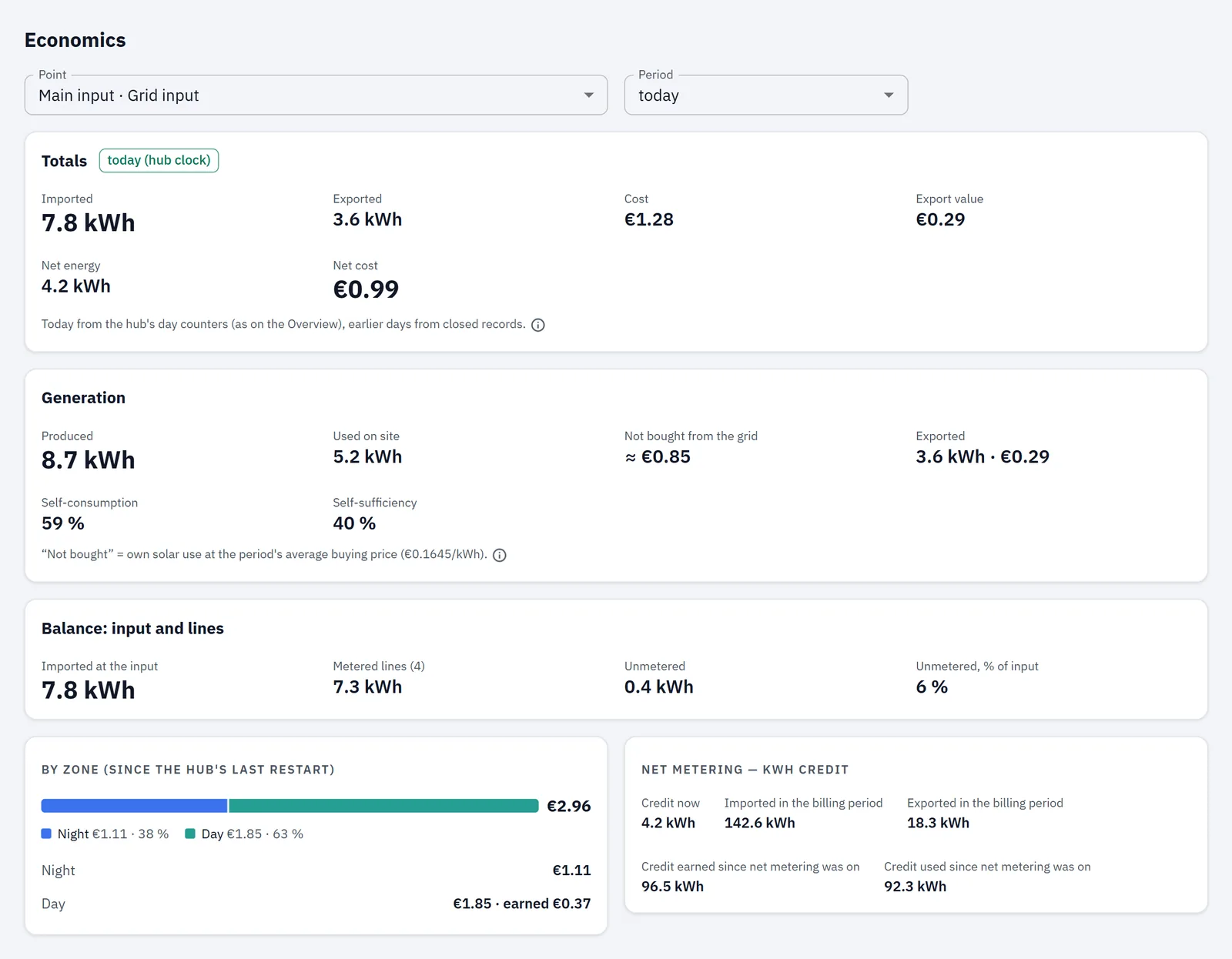
- Economics — the Generation block for any period: Produced, Used on site, Not bought from the grid (the app's estimate at the period's average buy price), Exported with its value, plus Self-consumption and Self-sufficiency. The generation figures need the second meter; export value does not. → Economics
- History — import drawn upwards and export downwards, hourly for 60 days. → History
- CSV — any of it, from the app, if you want to do your own arithmetic against the supplier's statement.
Wherever you open the app — from the hub itself or at webapp.rbgrid.io — the readings travel from your browser straight to the hub and not through our servers. Installed on the hub, it works with the internet down.
🔖 If you fit the second meter, fit its sensor with the arrow pointing from the inverter towards the panel: flow in the arrow's direction is what counts as production on a generation point, and there is nothing to set in software. Get the direction wrong and you'll see no production on the first sunny day and suspect the clamp. (Older firmware needed a hand-typed REST call to flip the point's sign instead. If you set one on an earlier version, clear it after updating or production reads backwards — the build guide has the line.)
A worked example
Say your plan is a two-rate one: 28p a unit by day, 12p at night, and your export rate is 5p — prices as they appear on a bill, which is how you type them in. These are an example, not anyone's tariff; put your own in.
On a sunny day the hub measures 9 kWh produced, 5 kWh used in the house as it was made, 4 kWh exported.
The money that actually moved:
- 5 kWh you did not buy at the day rate: 5 × 28p = £1.40 not spent.
- 4 kWh exported: 4 × 5p = 20p earned.
- So the day was worth £1.60 to you.
The money left on the table: had you used those 4 kWh instead of exporting them, you would have avoided buying 4 kWh at 28p — £1.12 — instead of being paid 20p for them. A difference of 92p.
🔴 That 92p is a ceiling, not a result. It is only realised for surplus you can actually absorb in the hours it occurs: if the immersion heater draws more than the sun is giving, the rest comes off the grid at 28p and earns nothing, and heating water you didn't need isn't a saving at all. What you recover is some fraction of 92p — which is exactly why the water heater belongs at noon rather than at 7pm, and why the fraction is worth measuring rather than assuming.
And the app does not print the 92p. It gives you the two numbers it measured — exported energy with its value, and what you didn't buy from the grid — and the comparison is yours to make, on paper or in the CSV. Don't go hunting the daily gap figure in the app and conclude you've set something up wrong. (The one app figure closest to it, Not bought from the grid, uses the period's average buy price rather than a single zone's rate, so it won't match hand arithmetic at one rate.)
At night the comparison inverts: there is no surplus, and the 12p rate is simply the cheapest time to run anything that can wait.
What this doesn't do
- It is not your supplier's statement. The hub measures at your supply with your own numbers; the supplier settles at their meter with theirs, on their own settlement rules. Two instruments agreeing to the penny would be the surprise. We don't publish a figure for the expected difference, because we haven't measured one against a real statement — if you do, the CSV is how you'd compare.
- Hourly history is kept for 60 days. If your supplier's statement arrives a quarter later, the hours from the start of that quarter have already rolled off into daily figures. To audit a whole quarter, download the CSV before it rolls, or pull
/api/v1/export.csvfrom the hub on a schedule. Day and month totals stay for about 13 months and 3 years. - Export value is never subtracted from your cost. Imported energy and its cost, exported energy and its value, side by side — never netted into one number, because what your supplier actually settles depends on your contract.
- Net metering adds a kWh credit, not money (see step 2).
- No fixed charges — standing charges are in no cost figure (see step 1).
- Half-hourly and agile tariffs are not supported today. The hub applies fixed zone schedules; dynamic and spot-price tariffs are on the roadmap — planned, not shipping. If your import price changes every half hour, a zone plan can only approximate it.
- No battery accounting in v1.1.x, and nothing models charge or discharge (see Scope above).
- A circuit's cost is its energy at the buy price, whatever fed it at that moment — solar or grid. What you actually pay shows at the supply meter.
- It controls nothing — no inverter, no battery, no load.
One thing it does do that's worth saying plainly: changing your prices doesn't rewrite your past. Cost is stored as it accrues, at the rate that applied then, so a new rate prices new energy and re-prices nothing. Last winter stays comparable with this one.
Next
- The full install, both meters and the panel drawing: a house that exports, built step by step
- Build the zones themselves: your supplier's day and night prices, applied to every circuit
- Two cheap windows in one day? How to enter them
- Send the readings to Home Assistant as well: a power meter for Home Assistant
- What the modules cost: Hardware
- Questions → Support