Economics
Economics puts money next to energy for one point at a time: what it imported and exported, what that cost at your tariff, and what the export was worth. Open it from the app's left navigation: Monitoring → Economics.
The prices come from your tariff plan (see Tariffs). Economics only shows figures; it doesn't change anything on the hub.
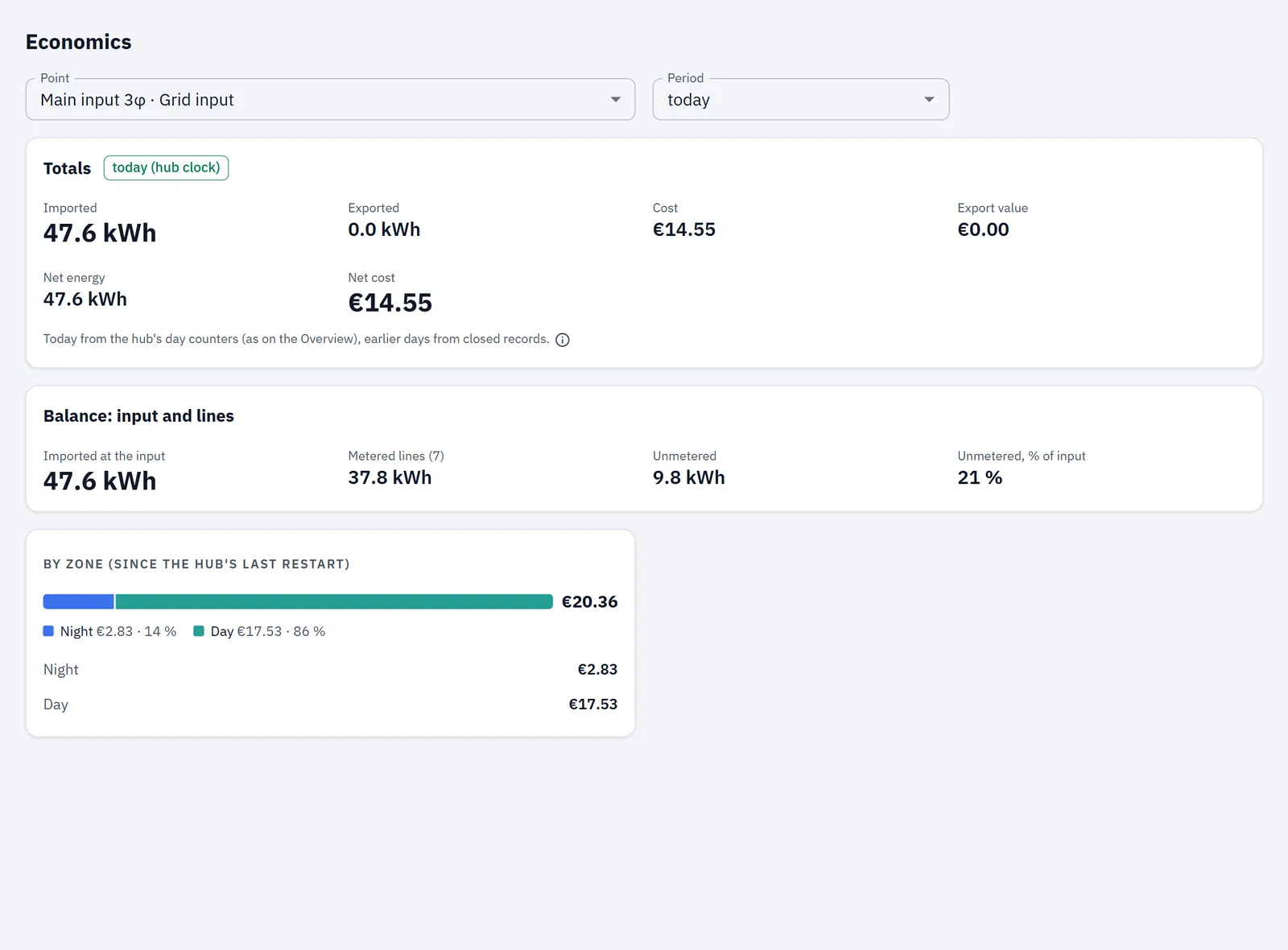
Selectors
- Point: every point that measures energy. The voltage bus isn't listed. The input comes first and is selected when you open the page. Each entry reads "name · role".
- Period: the period the Totals, Generation and Balance blocks cover.
| Period | Shown as | Built from |
|---|---|---|
| hour | last hour | the last closed hour |
| today | today (hub clock) | for the input, the hub's day counters; for other points, today's closed hours (see below) |
| yesterday | yesterday | closed records |
| last 7 days | last 7 days | closed days, plus today |
| this month | this month | closed days, plus today |
| last month | last month | closed records |
| this year | this year | closed months, plus this month's days, plus today |
All periods follow the hub's clock (see Time). A "closed" record is a finished hour, day or month.
How "today" is counted depends on the block:
- Totals for the input: today comes from the hub's day counters, which include the running hour (also for the today part of 7 days, this month and this year).
- Totals for any other point: closed records only; the running hour isn't included.
- Generation and Balance: today comes from each point's own day counter, for every point.
Totals
Always shown for the selected point:
| Tile | What it is |
|---|---|
| Imported | energy taken from the supply in the period |
| Exported | energy sent back in the period |
| Cost | cost of the imported energy at your tariff |
| Export value | value of the exported energy at your sell price |
| Net energy | imported − exported |
| Net cost | cost − export value |
A footnote says where the figures come from:
- past periods: "From the hub's closed records (days checked against the hour records)."
- the input, on periods that include today: "Today from the hub's day counters (as on the Overview), earlier days from closed records."
- other points: "From the hub’s closed records; the running hour is not included."
Points on a BASIC module count consumption only. For them, only Imported and Cost are shown, with a note that there is no export, export value or net figure.
If the point has no records for the period, the block says "No data for this point."
Generation
Shown only when at least one point has the Generation role and an input exists. It covers all generation points together and doesn't depend on the point you selected.
| Tile | How it is worked out |
|---|---|
| Produced | the energy your generation points sent out in the period |
| Used on site | produced − the part exported at the input |
| Not bought from the grid | an estimate: energy used on site × the period's average buy price at the input (input cost ÷ input kWh) |
| Exported | the part of production that left at the input (produced or input export, whichever is smaller), and the input's export value for the period |
| Self-consumption | used on site ÷ produced, in % |
| Self-sufficiency | used on site ÷ (used on site + input import), in % |
The caption under the block shows the average buy price used. Until the input has a cost for the period, it says the value of own use will appear later.
If there are no generation records for the period: "No generation data for this period."
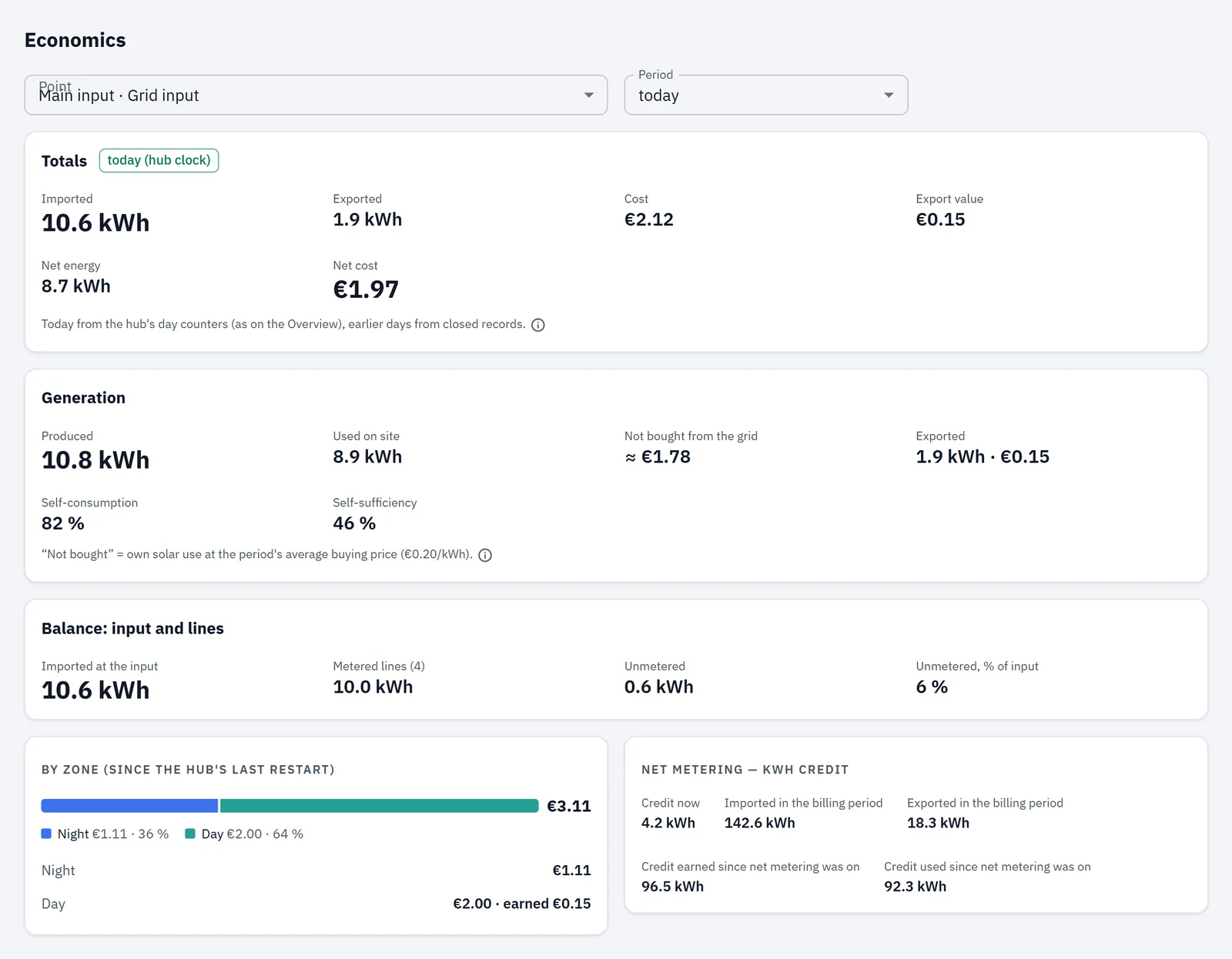
Balance: input and lines
Shown when an input exists and at least one line is metered. A line here is any point other than the input, a backup input, the voltage bus or a generation point.
| Tile | What it is |
|---|---|
| Imported at the input | what the input imported in the period |
| Metered lines (n) | the sum of what your lines imported; n counts the lines that have data for the period |
| Unmetered | input − the sum of the lines |
| Unmetered, % of input | the unmetered part as a share of the input |
The unmetered part is the consumption at the input that none of your points measures, for example circuits without a sensor.
If any line has no records for the period, the block names those points and shows "—" for Unmetered and Unmetered, % of input: they aren't counted until every line has data. Unmetered, % of input also shows "—" when the input imported nothing.
If the input itself has no records for the period, the block shows "No data for this point." instead of the tiles.

Running totals
The blocks below don't follow the Period selector. They follow only the selected point and show what the hub has accumulated.
By zone (since the hub's last restart)
A bar split by tariff zone, with the total cost. Below it, one row per zone that has a cost or export value, for example "Night", "Day" or "Evening peak": the cost, and "earned …" where there is export value.
The figures count from the hub's last restart. If there are no zone charges yet, the block says so.
Net metering — kWh credit
Shown when Net metering (selling to the grid) is on in your tariff plan; hidden while it's off (see Tariffs).
| Line | What it is |
|---|---|
| Credit now | the kWh credit you hold now |
| Imported in the billing period | kWh imported this month |
| Exported in the billing period | kWh exported this month |
| Credit earned since net metering was on | all credit earned so far |
| Credit used since net metering was on | all credit used so far |
The billing period is the calendar month: the credit is settled at each calendar-month boundary. The values are in kWh, as the hub reports them; the credit doesn't change the money figures.
If the input is on a BASIC module, which doesn't measure export, a note says no credit accrues and the figures shown were accumulated before.
Progressive tariff
This block appears only when the hub runs a progressive tariff, so on most hubs you won't see it. It then shows the current Tier, the Accumulated import in kWh and the Multiplier ×.
If the hub doesn't answer for these running totals, the blocks are simply not shown.
How money is shown
Amounts use the currency of the hub's active tariff plan and the number of decimals the hub reports. The export value is shown separately from the cost and isn't subtracted from it, except in Net cost.