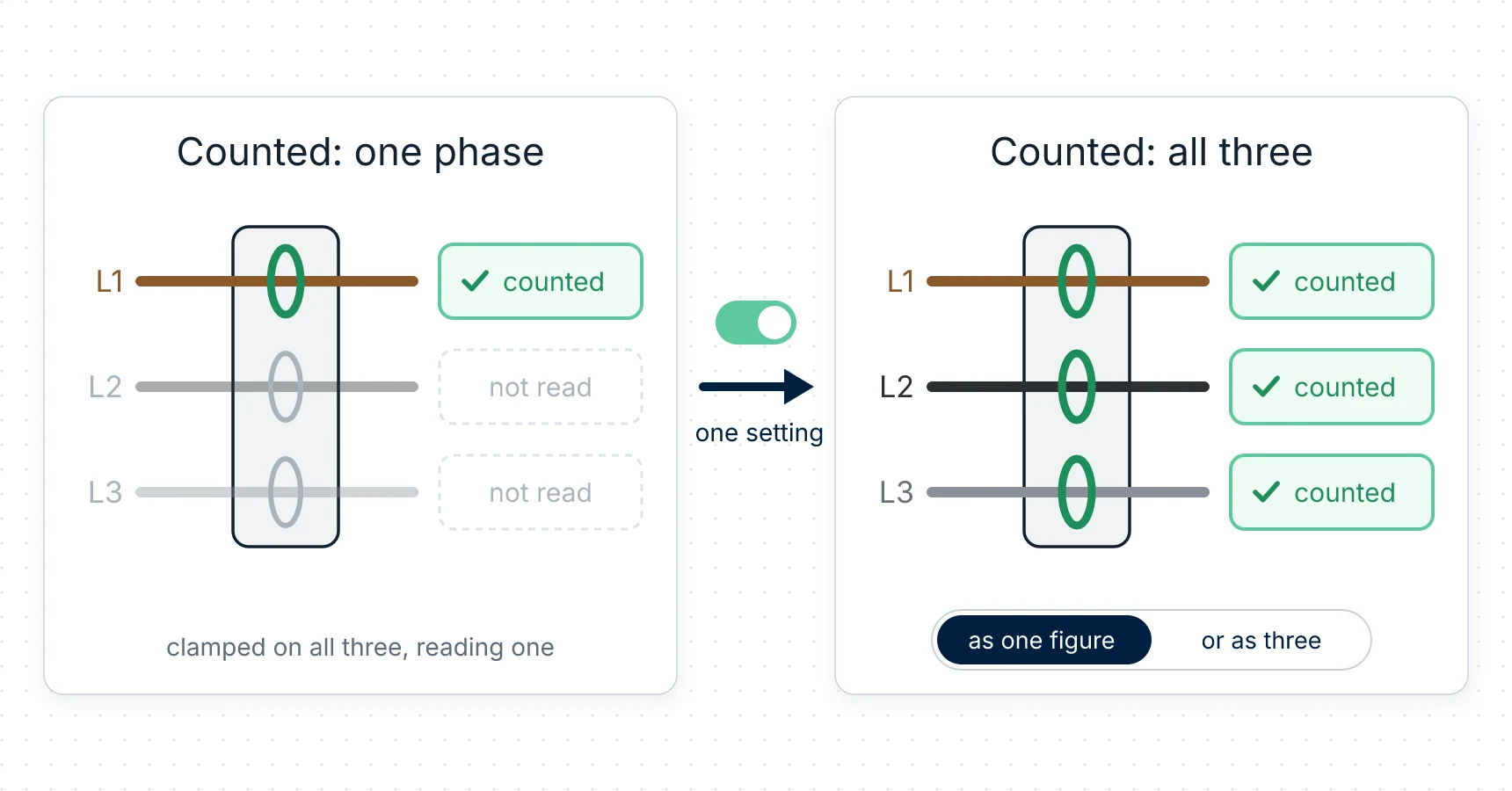
Your panel has three live conductors. Your hub, out of the box, is counting one of them.
That is not a fault, and the number it shows is not wrong — it is just a third of your house. The module card says so in as many words: "Input: measured on L1 only", with the hint "Only L1 counts toward the input; L2 and L3 of this module aren't in it." Until you tell the hub that this module is your three-phase input, L2 and L3 are sitting there unread.
This guide is the step from there to a supply measured on all three phases, and what the hub can tell you once it is.
Why it starts that way
A measurement point is bound to a channel. An rbAmp STD-U3I3 has three current channels and three voltage inputs — one per conductor — and when a hub takes it as the grid input, the input it creates is still one point on one channel.
Grouping the three into one input is a single action in the app, and it is the same action whichever way you later decide to count them. Nothing is rewired for it.
What you need
| Hub | An ESP32-WROVER board with PSRAM and 16 MB flash, and its USB power supply. |
| Input meter | One rbAmp STD-U3I3 on the three-phase input. Its three current sensors come paired with its channels at the factory and are not replaceable, so there is no clamp to buy for the input and no current sensor to choose in the app. |
The module's own wiring — the three voltage taps, the fuses, the neutral it needs, the sensor direction — belongs to the module, and rbAmp documents it: see the rbAmp wiring guide.
For any work inside an electrical panel, call a qualified electrician.
One thing to get right before anything in the app will make sense: the conductor you call L1 must be the same one everywhere — the module's L1 sensor and its L1 voltage terminal. The same for L2 and L3. The phase checks further down are what tell you whether you did.
Make the input three-phase
On Points, the STD-U3I3's card carries the grid input.
- Press Use as the three-phase input.
- Confirm Use as the input. The input keeps its history.
- The app says the hub will measure the input on all three phases after a restart. Press Restart now, or restart later.
After the restart the input is one point, L1–L3, with a reading for each phase. → Use as the three-phase input
If the button isn't offered, the module has to be present, you have to have an input, and the input must not be three-phase already. On a hub older than firmware v1.1.2 the card says so instead: "Three-phase input from one STD-U3I3: update the hub to 1.1.2."
Then tell the hub what kind of mains it is. Open Settings → Mains and choose Three phase. Mains system applies at once, and the Phase list on each point then offers L1, L2 and L3. Nominal voltage and frequency, if you change them, apply after a restart (Save and restart); the defaults suit a 230/400 V supply. → Settings
And give the input its limits, in the input's Point setup:
- Input limit, kW — what your supply contract allows. Without a contracted figure, use the main breaker: A × 230 V × 3.
- Input breaker, A — the main breaker's rated current, per phase.
Those two are what every "how close am I to the limit" figure is measured against, and the hub takes the smaller of them. → Grid input vs limit
What you can see once it is three-phase
On the input point's page, a Per phase (U3I3) table: L1, L2 and L3 with voltage, current, power, reactive power and power factor. Live values move every 3 seconds. → Points
On the Overview, the Phases card, which is where a three-phase supply stops being an abstraction. Its header says where the figures come from — measured at the input when a U3I3 measures each phase, estimated from lines when they are added up from circuits you have assigned to a phase — and it names your breaker setting, for example "breaker 3 × 35 A (per phase)".
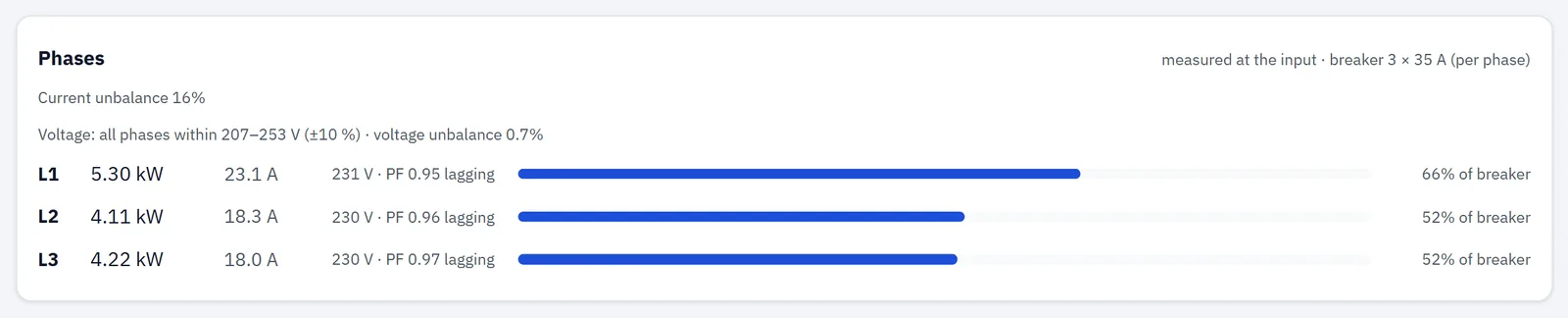
Demo data. On a real hub the card also reports the phase rotation.
Each phase row shows its power — with ↑ when that phase is exporting — and its current, against a bar for the breaker: above 80 % high, above 100 % overload. Measured, it also shows the voltage, flagged low or high beyond 10 % off nominal, the angle against L1, and cos φ, marked lagging or leading.
And four checks, which are the part worth reading on the day you install it:
| The check | What it answers |
|---|---|
| Phase rotation | "Phase rotation forward (L1 → L2 → L3)." — or reversed, with a warning that three-phase motors and pumps will turn backwards; or that the phases aren't 120° apart, so a phase looks missing or wired to the wrong place. |
| Current unbalance | The largest deviation of a phase current from the average, as a percentage; above 20 % marked high. It is assessed only from 1 A per phase upward, because below that a single lamp swings the figure. |
| Voltage band | Whether all three are within 207–253 V — 10 % either side of 230 V — or which phases are outside, with the voltage unbalance. |
| Coverage | On an estimate, when your circuits cover less than 80 % of the input, a warning that the phase load is understated. A U3I3 on the input is what turns the estimate into a measurement. |
The rotation check is the one that earns its place immediately: it is how you find out that the conductor you labelled L2 is not the one the module thinks it is. The unbalance figure is the one that earns its place over months — it is the answer to "which phase is carrying the house", and the reason a breaker on one phase trips while the other two sit at a third of their rating.
One point, or one point per phase
From v1.1.5 the same supply can be counted two ways, and the module card says which it is in, with a button for the other:
| The card says | What it means |
|---|---|
| "Input: one point for all three phases (phases netted)" | "Like a meter that nets the phases: export on one phase offsets import on another." |
| "Input: one point per phase" | "Like a meter that counts each phase: every phase has its own import and export, nothing is offset." |
Which one is right for you is your meter's behaviour, not a preference — a meter that nets the phases and a meter that counts each phase bill the same house differently. If nothing you own exports, the difference is small and the grouped point is where a hub starts. If you have solar on one phase, it is the difference between seeing your export and not seeing it, and that is worth the ten minutes: → What a three-phase house sends back, and what each zone pays for it
Either way the change applies after a restart, and going from per phase back to one point deletes the L2 and L3 points and erases their own history — their totals move into the input, so the site's totals stay, but the per-phase records are gone. Download what you need first. The full set of confirmations is in Sensors and modules.
⚠️ One hard rule: before installing firmware older than v1.1.5 on a hub whose input is metered per phase, switch it back to one point. Older firmware handles one supply point only.
History and what it costs
A grouped input is one point, so it takes one of the twelve points the hub keeps history for. Split per phase it takes three. On a house with a lot of metered circuits that is a real choice, not a detail. → How many circuits can one hub handle?
History on the hub runs by hour for 60 days, by day for about 13 months and by month for 3 years, and any of it downloads as CSV. Split per phase, the History page shows L1, L2 and L3 separately, each with its own charts, tables and downloads. → History
From firmware v1.1.6 a split input also gets its household view back: the hub serves the three phase points as one summed series, so the Overview's today-by-hour, "today vs yesterday", month-to-date and forecast, and the Economics totals, all cover the whole supply again. You get the per-phase view and the whole-house view. → What's new in v1.1.6
Money follows the same path as on any other point: each zone's own price, applied to the energy in that zone, and export valued at that zone's sell price. → Your own time-of-use tariff · Tariffs
What one module on the supply will not tell you
- Which circuit. The input measures the whole supply, phase by phase. Naming the heat pump, the EV charger or the workshop's compressor needs a module on those circuits — one per phase, because a module works out power from its own single voltage input. → What the heat pump and the EV cost, per phase and per zone · Which machine is costing you, in a workshop
- A split-phase supply. Two live legs sharing a neutral, as in North America, is not a three-phase supply and is not what this does; it is planned for a future release.
- What to switch off. RBgrid measures and prices; it doesn't control loads. What you turn off, and when, stays yours. → Does RBgrid switch loads?
If something's wrong
- Use as the three-phase input isn't offered: the STD-U3I3 must be present, you must have an input, and the input must not be three-phase already. → Sensors and modules
- You pressed a mode button and nothing seemed to happen: the change needs a restart, and on app v1.1.5 that message sat above the module list, where it could be off the top of the screen. Scroll up.
- The Phases card isn't there: it appears when the mains is multi-phase — declared in Settings → Mains, or reported by the input itself.
- The rotation check says the phases aren't 120° apart: a phase is missing, or a voltage tap is on a different conductor from the sensor that is supposed to match it.
- A phase reads an implausible power: check that its sensor and its voltage terminal are on the same conductor.
- The phase figures say "estimated from lines": the input isn't three-phase yet, or the module isn't the one carrying it.
- The per-phase figures look right but a period total looks short: on firmware v1.1.5 a split input's per-period figures covered the L1 point only. v1.1.6 fixed that. → What's new in v1.1.6
Next
- The arithmetic of a grouped point, measured on a bench in both directions: What a three-phase house sends back, and what each zone pays for it
- What an exported kilowatt-hour is actually worth: What your solar export is worth in pounds, not kilowatt-hours
- The same supply with circuits on it, as a finished build: the three-phase house · the workshop
- Pricing it: Your own time-of-use tariff on the device · Two cheap windows a day
- The data in Home Assistant: A power meter for Home Assistant
- Questions → Support