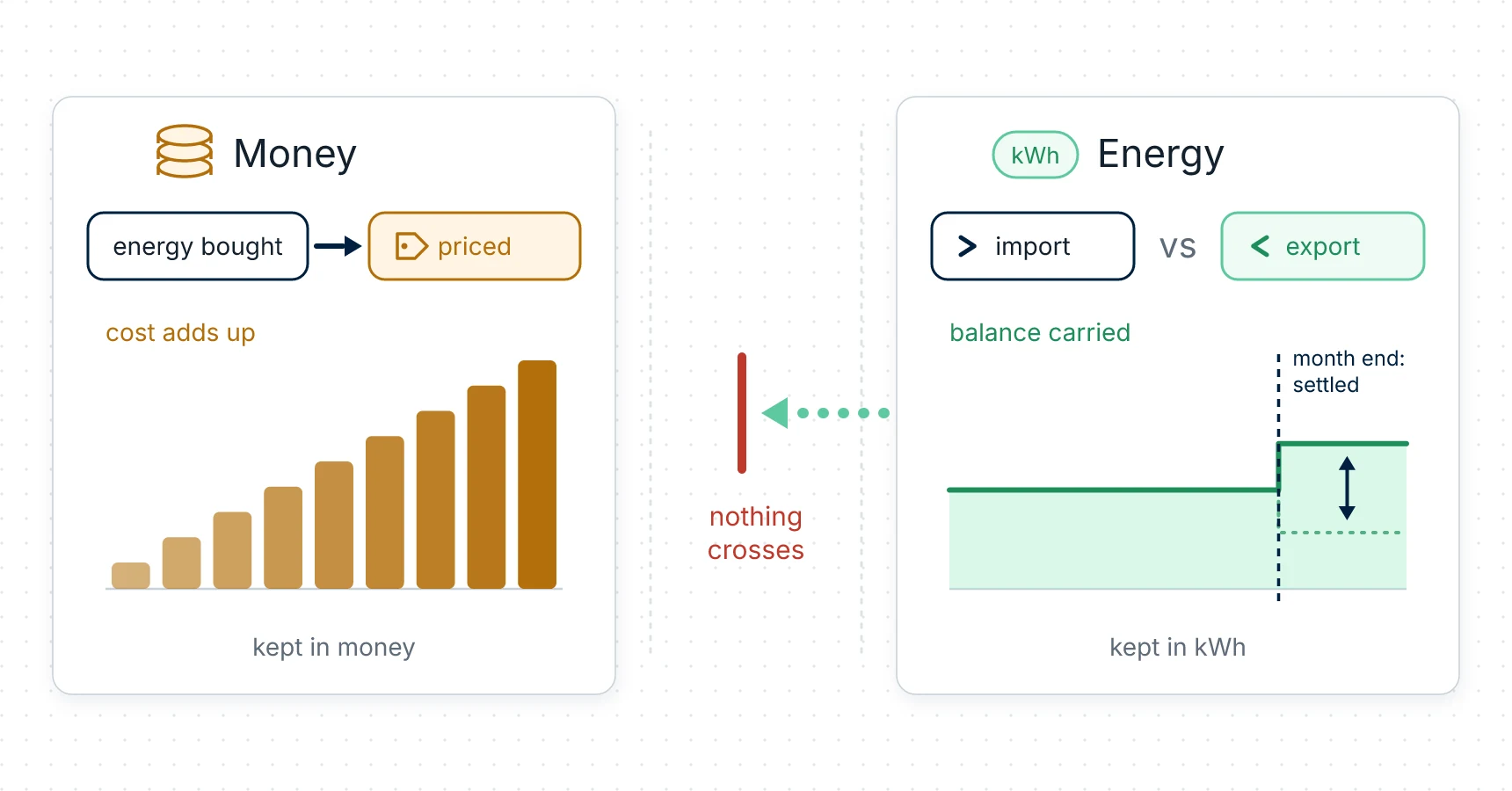
You switched Net metering on, you have been exporting for a fortnight, and the cost figure looks exactly as it did before.
Nothing is broken. The hub's net metering is a bank of kilowatt-hours, not a discount, and it is deliberately kept out of every money figure the hub stores. That is the whole mechanism, and once you know it the Economics card reads differently.
What the credit actually is
Your plan carries a toggle labelled Net metering (monthly kWh credit). With it on, the hub keeps a running balance in kilowatt-hours: energy you exported counts against energy you imported, and the balance is settled at each boundary of the local calendar month.
What the settle does, in one sentence: at each month end the hub nets that month's import against its export — a surplus is added to your credit (at the plan's selling ratio, which is 0.7 unless someone changed it — see below), a shortfall is paid out of the credit first, and only what's left over is billable. The credit then carries into the next month, up to a ceiling of 1,000 kWh. The month's import and export counters start again; the bank does not. (Both the carry-over and that ceiling are fields of the plan rather than properties of the firmware. A plan built in the app takes the defaults — carry-over on, 1,000 kWh — and the app has no control for either.)
The credit is in kWh. Not in money, not as a percentage, and never as a subtraction from the cost of the energy you bought. Your cost figures are computed the same way whether the toggle is on or off: imported kilowatt-hours at the buy price of the zone they arrived in, plus per-kWh fees, plus VAT. Nothing subtracts credits from them.
So the answer to "why didn't my costs move" is: because they are not supposed to. The credit is a separate account, and the hub reports it separately.
Is this your contract?
This is the one decision on the page, and it is about your supplier's terms rather than a preference.
| Your contract | What to do |
|---|---|
| A month's export is netted against a month's import, and you settle the balance | Switch Net metering (monthly kWh credit) on. That is what it models. |
| You are paid per exported kilowatt-hour — a Smart Export Guarantee tariff, for example | Leave it off, and put your export rate on each zone. → What your solar export is worth in pounds, not kilowatt-hours |
| Your supplier pays nothing for export | Leave it off and set the sell prices to 0. The export figures still tell you what you are giving away. |
Your export is valued either way. The toggle has never controlled whether exported energy is priced — exported kilowatt-hours are valued at the sell price of the zone they left in, with net metering on or off. The app says so itself when the toggle is off: "Exports are valued at the zones' sell prices below even with net metering off. Net metering adds the kWh credit on top. No feed-in contract? Set the sell prices to 0."
Switching it on when your contract isn't that adds a card describing an arrangement you don't have. It costs you nothing in accuracy — no stored figure changes — but it is a number you'd then have to explain to yourself every month.
Turning it on
It lives on Tariffs, as part of the plan: whatever the toggle shows when you press Save is what the hub keeps. → Tariffs
With the toggle on, two more fields appear with it:
- the selling ratio, a number from 0 to 1 — a share of the buy price;
- a read-only Selling price /kWh (calculated), which is what that ratio comes to.
The app explains the pair in its own words: "A zone's selling price is the money you get per exported kWh. The selling ratio prices exports in zones without their own selling price (buy price × ratio), and the hub uses it in the monthly kWh-credit settlement."
⚠️ Read that explainer twice, because the ratio does two jobs and only one of them is a fallback. As a price it is a fallback: a zone with its own sell price uses that, and a zone added in the app always carries one. But the second clause is the one that matters here — the hub also uses the ratio at the monthly settlement, where a surplus month is added to your credit at that ratio.
So the number to know is 0.7. On firmware up to v1.1.6 that is what a plan starts with, and the app never writes one of its own, so unless somebody has typed into that field it is what your hub is using: a surplus month adds 70 % of the net surplus to your credit, not all of it.
And one line that will save you an argument with the screen: when every zone has its own sell price, the app replaces the field with "Every zone has its own selling price — the selling ratio is not used. Only zones without a price use it." That is true of pricing and not of the credit — the settle still applies the ratio. So don't read that sentence as a promise that your whole surplus is banked.
Prices themselves follow the usual habit from the export guide: fill the sell price in on every zone, because export is valued at the price of the zone it left in.
If your contract pays nothing per exported kWh and only nets kilowatt-hours, the sell prices and the ratio belong at 0. Watch for this after the setup wizard's quick tariff, which writes the export price you gave it into every zone.
Where to read it
Economics grows a Net metering — kWh credit block, shown only while the toggle is on:
| The line | What it is |
|---|---|
| Credit now | the kWh credit you hold now |
| Imported in the billing period | kilowatt-hours imported this month |
| Exported in the billing period | kilowatt-hours exported this month |
| Credit earned since net metering was on | all credit earned so far |
| Credit used since net metering was on | all credit used so far |
The billing period is the calendar month, and the settle happens at each month boundary. The figures are in kilowatt-hours as the hub reports them. → Economics
If your own supplier's billing period doesn't start on the first of the month, this is the place where your figures and theirs will differ by exactly those few days. The hub settles on the calendar month; it doesn't take a billing date.
Set the toggle once, to match your contract, and leave it. The bank is the hub's own state: switching net metering off and on again doesn't clear it — the credit resumes from whatever it held. On a plan that carries over, it is cleared only when the point itself is deleted, which is the next section.
What it doesn't do
- It changes no money figure. Not the 15-minute records, not the hourly, daily or monthly history, not the lifetime counters. Cost is imported energy at your buy prices; export value is exported energy at your sell prices; the credit sits beside both.
- It doesn't net your money either. Import with its cost and export with its value are shown side by side and never merged into one number — the single exception being the Net cost tile, which is the one figure that does subtract export value, and says so on its face.
- It isn't your supplier's statement. The hub counts at your supply with your own prices and a calendar month; your supplier settles at their meter, on their rules and their dates. What they owe you is in your contract, not in this card.
- It doesn't need a Main Supply point — but binding your supply as Main is still worth doing, so the hub's totals describe your whole connection rather than a part of it.
- It can't count export the meter can't see. If your input is on a BASIC module, which measures one direction only, no credit accrues; the card says so, and any figures it shows were accumulated earlier. Export metering needs an STD module on the supply. → Hardware
- There is no battery accounting in v1.1.x, so nothing here models charge or discharge.
One piece of housekeeping
Deleting a point clears its net-metering record along with it — the credit bank and the current period's balance — so a channel bound again later under the same ID starts its credit at zero. That is firmware v1.1.6; on v1.1.5 and earlier a reused ID carried on the removed point's credit, which is worth knowing if you ever wondered where a credit balance came from on a point you only just created.
Either way, deleting a point erases its stored history for good, so download what you want to keep first. → History downloads
The short version
Net metering on the hub is an accounting of kilowatt-hours that runs beside the money and never touches it. Switch it on if your contract nets a month's export against a month's import; leave it off if you are paid per exported kilowatt-hour, and price your zones instead. Either way the export itself is measured and valued — the toggle only decides whether the hub also keeps the credit.
Next
- The money half, with both prices and the gap between them: What your solar export is worth in pounds, not kilowatt-hours
- The build it all sits on: a house that exports, step by step
- If your supply is three-phase, read this before trusting an export figure: What a three-phase house sends back, and what each zone pays for it
- Setting up the zones themselves: Your own time-of-use tariff on the device
- Questions → Support