Dynamic prices
Your supplier's price changes every 15 minutes; this page is where you see what it is now, where it came from, and what it was for every period the hub has already booked.
Where it is: Management → Prices in the menu, after Points and Tariffs. The page is there only when the hub reports that it can do dynamic prices — hub firmware 1.2.0 or later. On an older hub the menu item is absent, and opening the address directly says so rather than asking the hub anything.
It needs a direct connection to the hub. Reached another way, the page says: "Dynamic prices are set over a direct connection to the hub."
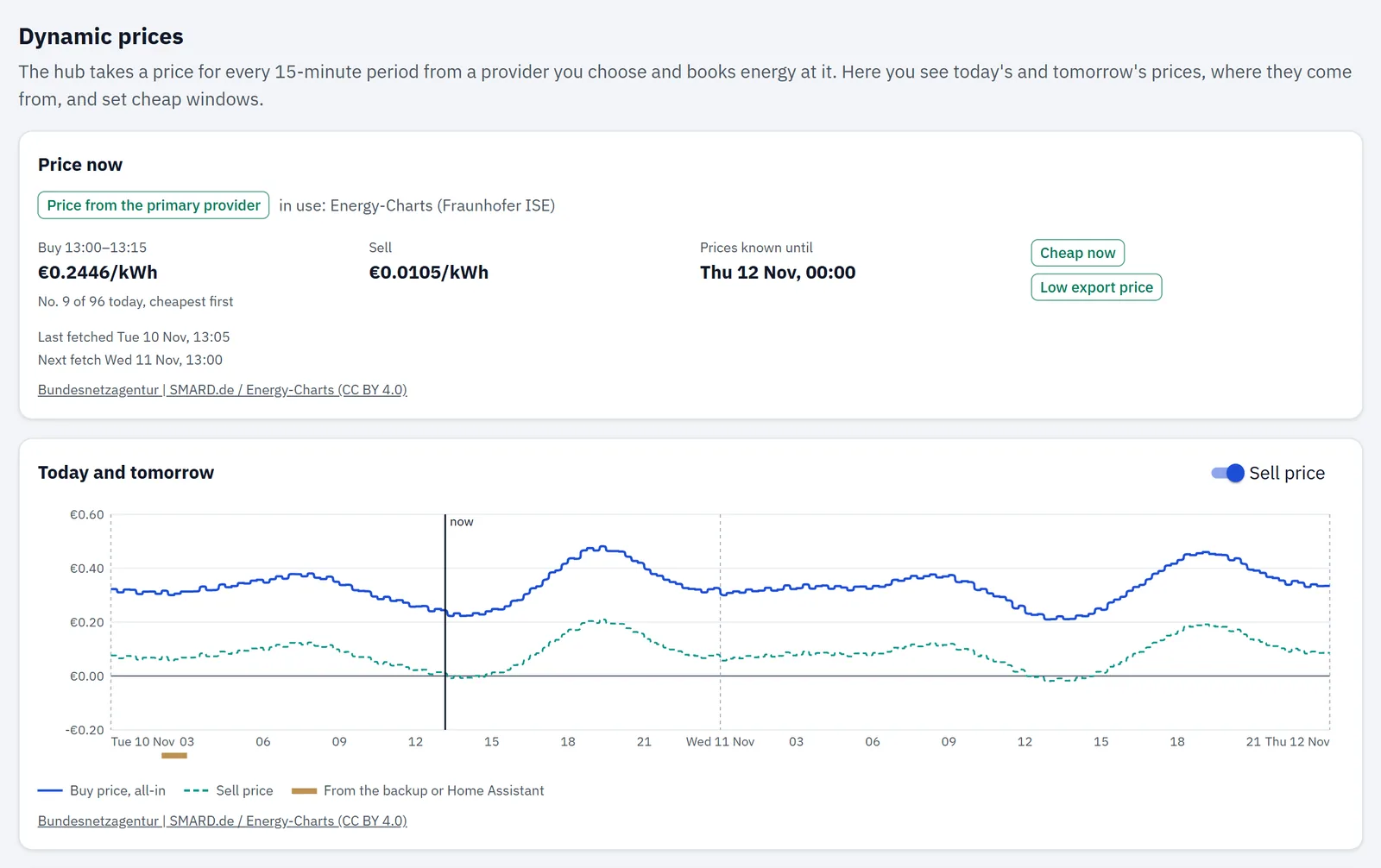
How the price is actually arrived at — the provider, the backup, your plan as the fallback, and what your contract does to a market price — is one page across: Where your price comes from.
Price now
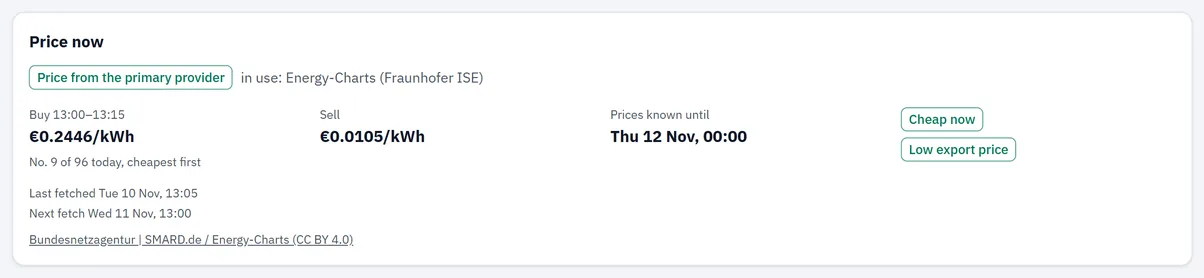
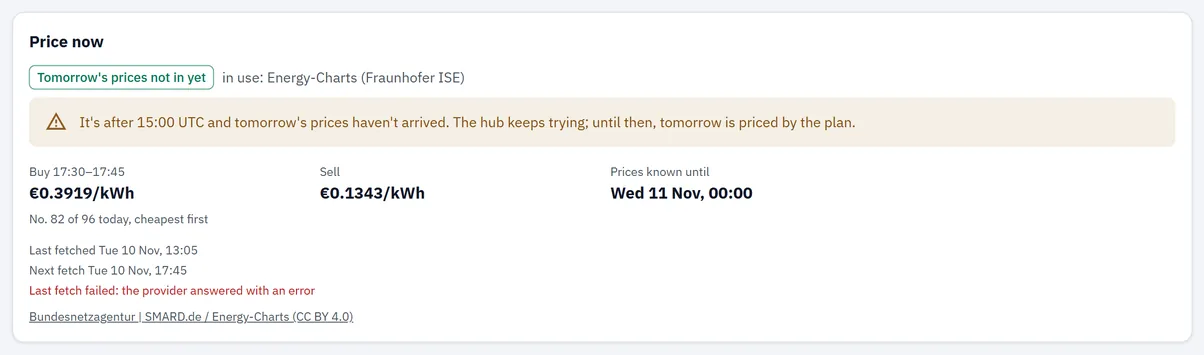
The chip is the state, and next to it is the source actually in use:
| The chip says | It means |
|---|---|
| Price from the primary provider | the ordinary case |
| Price from the backup provider | the primary has no price for now |
| Tomorrow's prices not in yet | after 15:00 UTC and tomorrow still hasn't arrived |
| No price from Home Assistant | Home Assistant is the source and nothing it sent covers now |
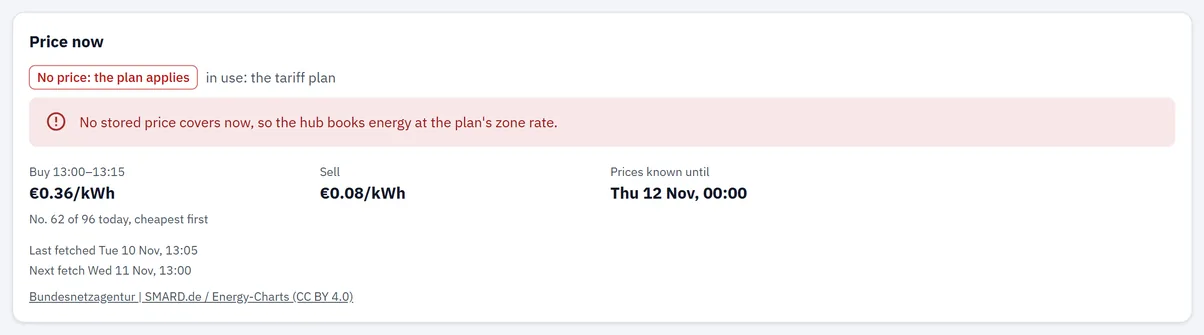
| No price: the plan applies | nothing stored covers now, so the zone rate prices it |
| Dynamic price off | the plan prices everything |
Every state but the first two carries a line under it explaining what to do about it, and the page says plainly which source it is using — down to "in use: the tariff plan" when that is the answer.
The figures. The buy price is for the period named beside it and is the all-in price: what a kilowatt-hour in this period actually costs you, with your contract and charges already in it. Under it, where the period stands in the day: "No. 9 of 96 today, cheapest first" — the single most useful number on the block, because it turns a price into a judgement without you having to know what a good price is this week. Prices known until is how far ahead the hub has data.
The two chips on the right repeat what the hub is publishing to automations right now: see Notification flags below.
The two fetch lines are not always both there, and their absence is information. Last fetched appears once the hub has fetched since it started, so it is missing on a hub that has just restarted. Next fetch appears only while the hub is retrying — tomorrow not published, an error, or no data for your zone. In the ordinary state there is nothing to schedule and the line is absent, which means: a missing Next fetch is the normal case, not a sign that fetching has stopped.
The attribution line is the provider's own wording and a link to its terms. It is not decoration — it is the condition the data is served under, and it tells you what you are looking at.
When the fetch fails
Under the fetch times, in red: "Last fetch failed:" and the reason, in the app's words — no connection to the provider · the provider answered with an error · the provider's answer couldn't be read · the provider refused the token · no prices for this zone · too many requests, the hub retries later.
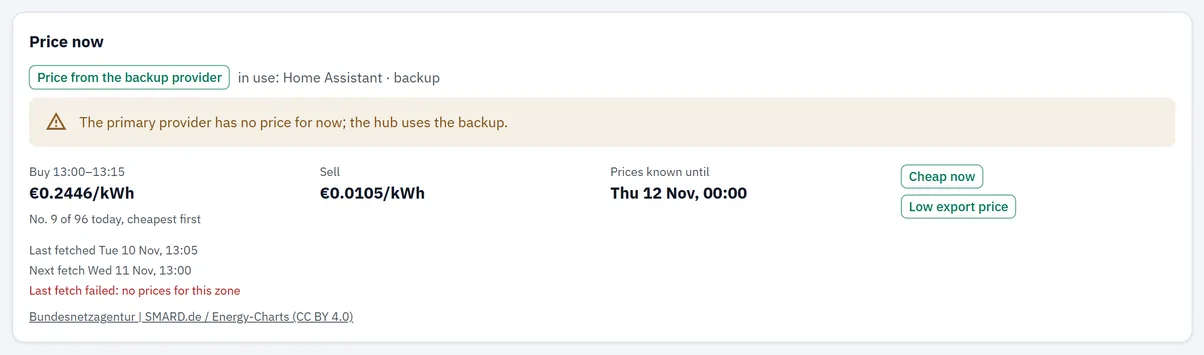
The backup is doing its job here: the primary answered that it has nothing for this zone, and the hub carried on with the second source rather than falling back to the plan.
Today and tomorrow
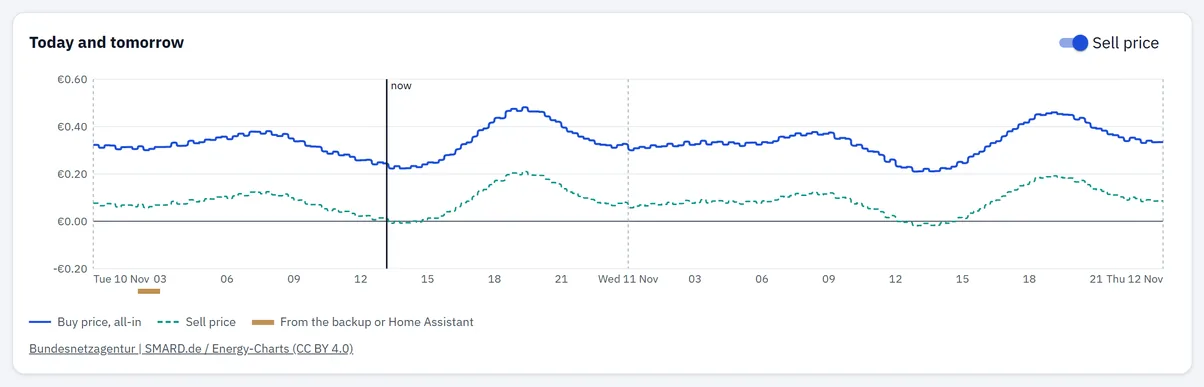
One step per 15-minute period, the all-in buy price, across today and tomorrow, with now marked. The dashed line is the sell price; the switch in the block header hides it, and it only appears at all when some period has one.
The strip under the axis is the part worth learning to read. It marks the periods that were not priced by your primary source: brown for the backup or Home Assistant, and a separate mark for periods the plan priced because nothing covered them. A chart with no strip is a day entirely on market prices; a strip at one end usually means prices arrived late and the plan covered the gap.
Before tomorrow is published, the chart says so instead of looking broken:
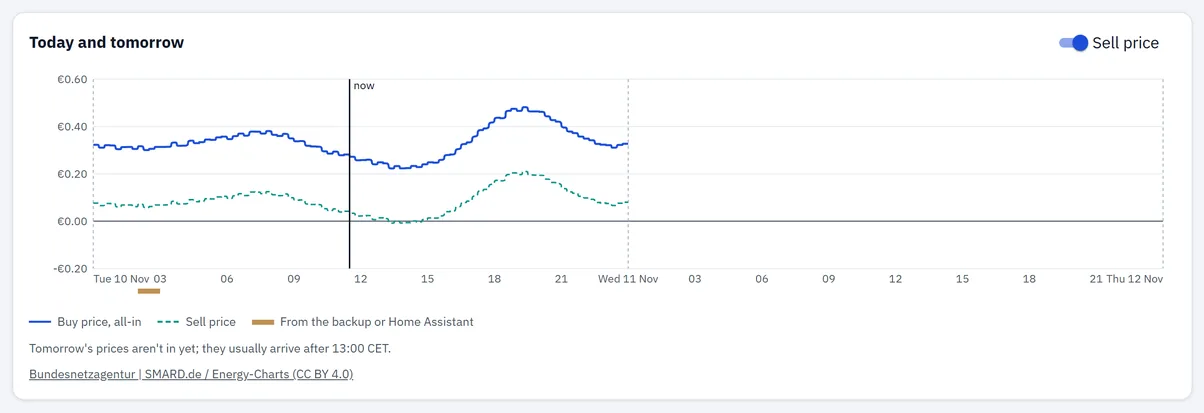
⚠️ An empty second half before mid-afternoon is normal. Day-ahead prices for tomorrow do not exist yet. The hub starts asking at 11:00 UTC and they usually arrive after 13:00 CET; it keeps trying on its own.
Where the price comes from
The settings. Use a dynamic price is off until you turn it on, and everything below appears only while it is on. Switched off, the page states what that means: energy is priced by the tariff plan — and prices pushed in from Home Assistant still apply, as a spot price.
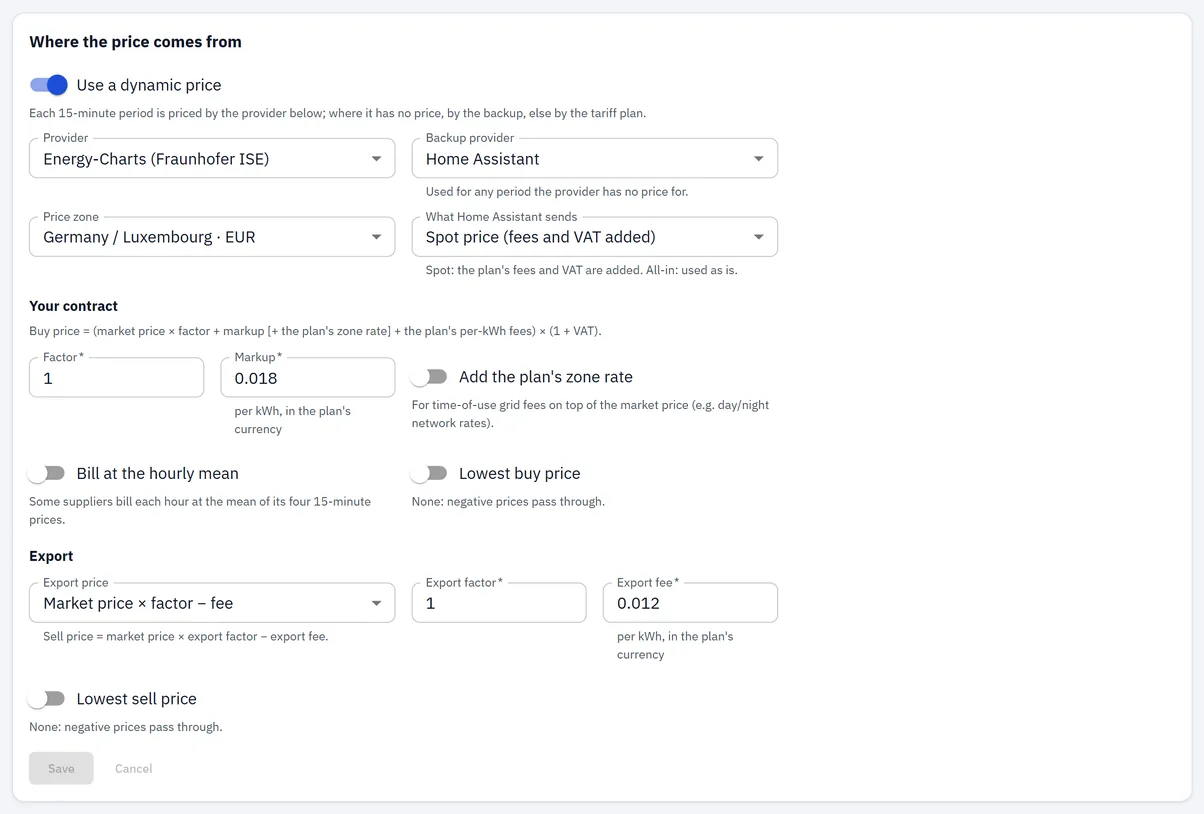
Provider and Backup provider come from the hub's own list, and the backup offers None. An all-in provider is listed with · all-in after its name — that is where you read a provider's kind, because for a network provider the hub decides it and you cannot.
Price zone appears for network providers only. With two of them set, the list holds only the zones both serve, each shown with its currency.
⚠️ A zone in another currency than your plan is refused by the hub. The field turns red and says which currency each is in. The hub converts nothing: set the plan's currency on Tariffs first, then choose the zone. The app lets you press Save; the hub is the one that says no.
What Home Assistant sends — spot or all-in — appears only when Home Assistant is the provider or the backup. This is the only place the all-in question is yours to answer. Get it wrong and every cost figure in the app is wrong with it, because a spot price has your taxes and VAT added and an all-in price must not.
Your contract states the formula being applied, in one line, for whichever kind is in force. On a spot source it is followed by Factor, Markup, and a switch to add the plan's zone rate on top — that last one is for time-of-use grid fees, such as a cheaper network rate at night, sitting on top of a market price.
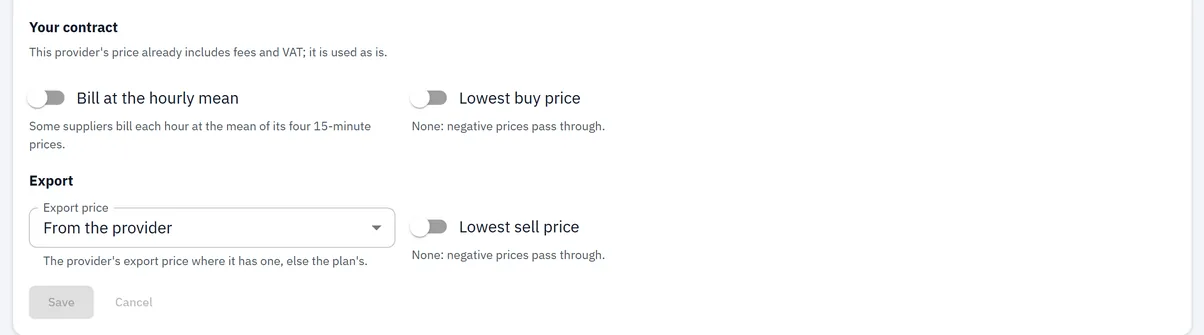
On an all-in source the formula line is the whole story and there are no contract fields: nothing of the plan is added, which is exactly what stops the taxes being counted twice.
Bill at the hourly mean, the two floors and the export price mode apply either way. What each does, and when you want it, is in Where your price comes from.
Cheap windows
The hub works out when the price is low and says so — in the notification, in the event log and over MQTT.
⚠️ It switches nothing itself. A window is a statement, not an action; an automation elsewhere acts on it.
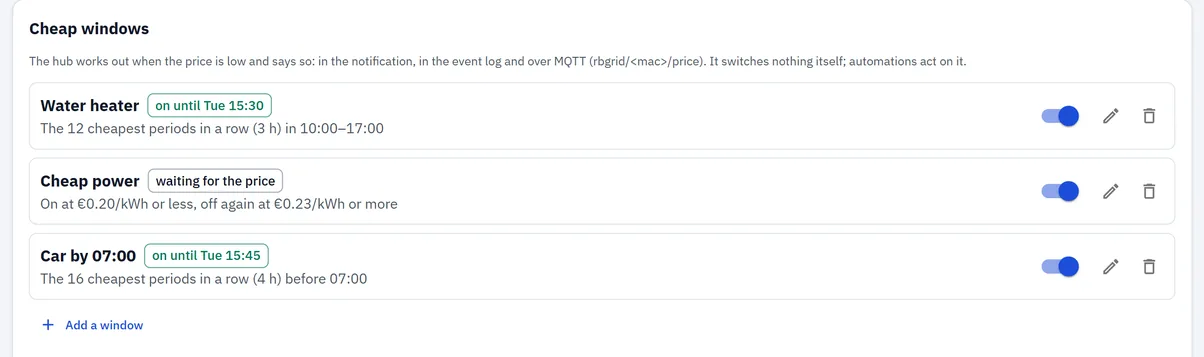
Each row carries its state as a chip — on until, next, not today, waiting for the price, none left before, off — and a one-line description of the rule in words. Up to eight; at eight the button reads Up to 8 windows and stops.
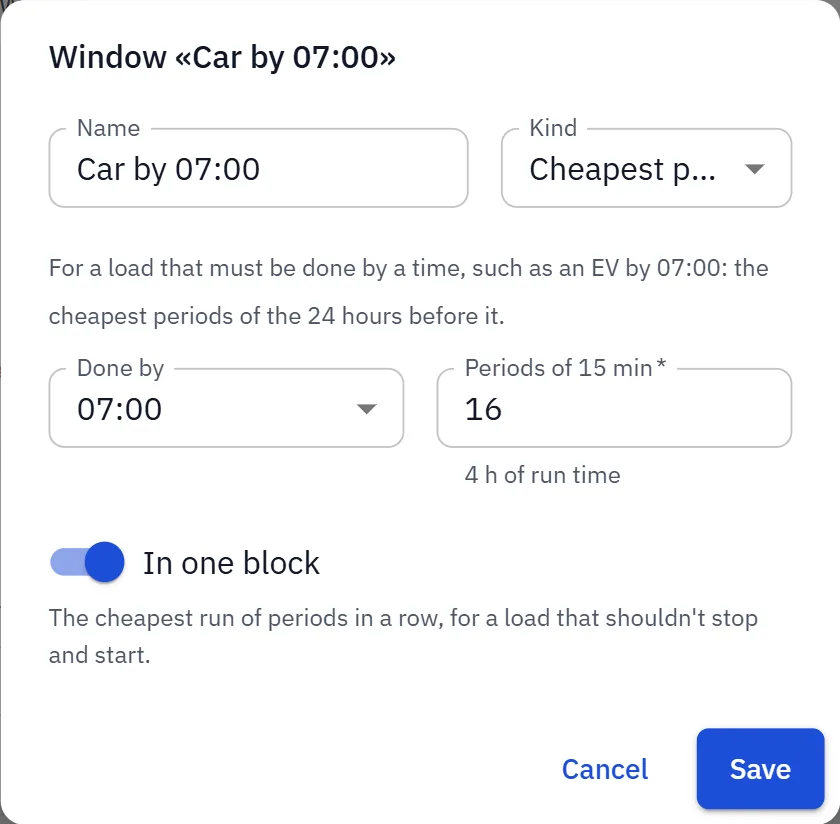
The three kinds, each with the app's own description of what it is for:
| Kind | For |
|---|---|
| Cheapest periods in a time span | a load that can run any time in a span, such as a water heater |
| Cheapest periods before a time | a load that must be done by a time, such as an EV by 07:00 |
| Price below a level | running whenever the price is under a figure you name |
In the dialog the Kind field is narrow and cuts the text to "Cheapest p…". Both cheapest kinds begin the same way, so read the description underneath — it is the sentence that tells them apart.
Periods of 15 min is the run time you want, shown back to you in hours. In one block asks for the cheapest unbroken run rather than the cheapest scattered quarter-hours — the difference between an hour of heating and four separate ones.
Deleting a window warns what it costs: "Automations that follow it stop getting its on/off."
Notification flags
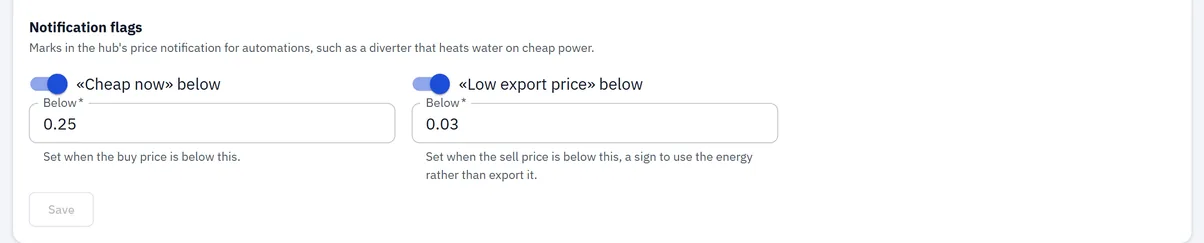
Two levels, published as marks in the notification for automations to read. Cheap now when the buy price is below yours; Low export price when the sell price is — a sign to use the energy rather than export it.
Unlike a window, a flag has no hysteresis and no look-ahead: it is a statement about the price this minute. What the notification contains and how to consume it correctly is in Knowing when energy is cheapest.
Import peaks
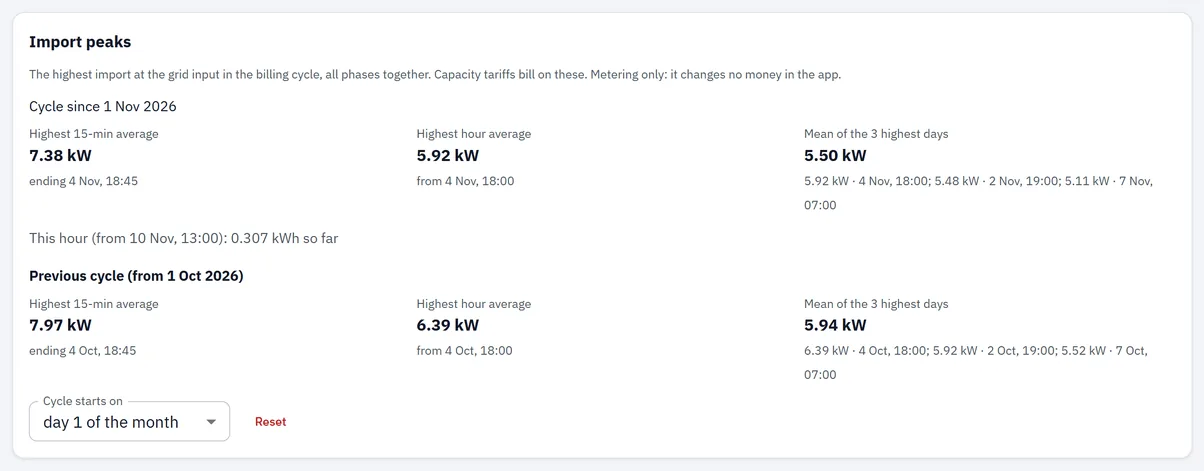
The highest import at the grid input in this billing cycle, all phases together, as power. The block says what it is for in one line — capacity tariffs are billed on figures like these — and immediately what it is not: metering only, it changes no money in the app.
Three figures for the current cycle and the same three for the previous one, plus the hour being accumulated right now. Cycle starts on is a day from 1 to 28; changing it warns that a new cycle begins at once and the current figures move to previous. Reset clears this cycle and starts counting again.
What each figure means, why the day limit is 28, and why it will not match your supplier's number exactly: The highest 15 minutes of the month.
Applied prices
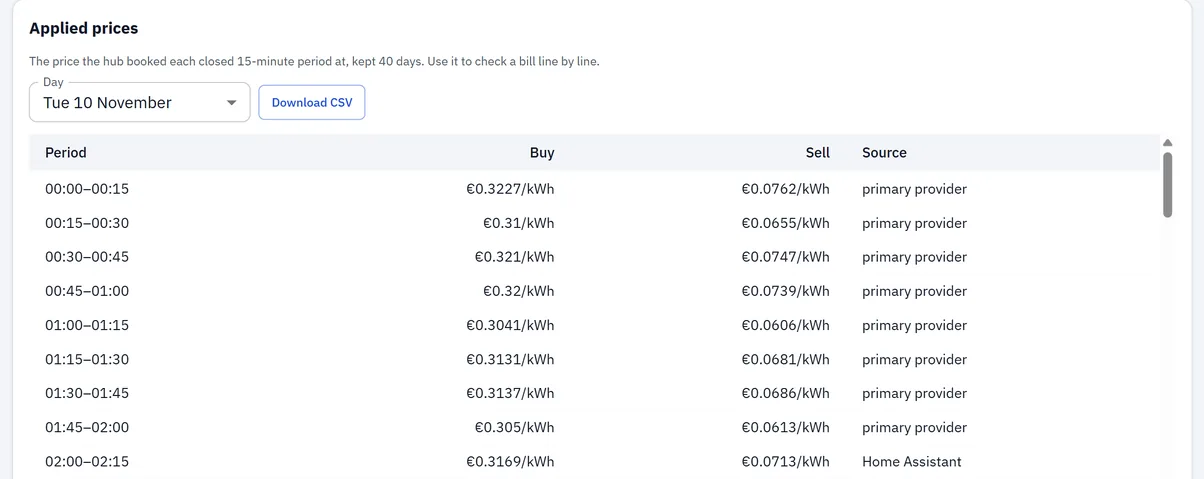
The price the hub actually booked each closed 15-minute period at, kept for 40 days, with where that price came from: primary provider, backup provider, Home Assistant or the tariff plan — and · hourly mean where your contract's hourly setting did the billing.
Download CSV gives one day as rbgrid_prices_YYYY-MM-DD.csv, with the start time in the hub's own time,
the all-in buy price, the sell price and the source.
🔑 This is the block that makes a cost figure checkable rather than something to believe. Everything else on the page tells you what the price is; this one tells you what you were actually charged, period by period, with its provenance — and 40 days is long enough to still have it when a statement arrives.
Long days are paged: the hub sends up to 400 periods at a time, and the table says so when there are more.
⚠️ A day can hold fewer than 96 rows, and that is not a lost price. The log records the periods the hub was running through. A restart, an update or a power cut leaves a gap — single periods or a whole hour — and the gap means the hub was not there, not that a price went missing. Energy measured across such a break is still counted; what it was costed at is in How cost is calculated.
Elsewhere in the app
-
Tariffs — while a dynamic price is on, a note at the top says so and explains that the zone rates below now apply only where the dynamic price has none. Open prices leads back here; it is the only link between the two pages.
-
Overview — the Today card shows Price now: dynamic with the rate in force.
- Events — the Hub log carries the price lines: configuration changes, each fetch
that stored periods, state changes, windows opening and closing, and
FAIL price:with its reason.
What to check when something looks wrong
The Prices menu item isn't there. The hub doesn't report dynamic prices, which means firmware older than 1.2.0. The Tariffs page is what prices energy on that hub.
The page says it needs a direct connection. It is reached through something that isn't a direct connection to the hub. Open the hub by its own address.
Save is greyed out. Either nothing has changed yet, or a field on screen has an error — most often no zone chosen for a network provider, or the backup set to the same provider as the primary. The field says which.
I pressed Save and the hub refused it. The app checks ranges and shapes; the hub decides the rest and says which field it refused. The usual one is a zone priced in a different currency from your plan — the hub converts nothing. Setting an admin token is also required to save.
The chart's second half is empty. Before mid-afternoon that is normal — tomorrow isn't published. After it, the state chip will say Tomorrow's prices not in yet and the fetch line will say why.
A stretch of the chart has a strip under it. Those periods were priced by the backup, by Home Assistant, or by the plan. That is the fallback chain working, not a fault — but if the strip is most of the day, your primary source isn't delivering, and the fetch line under Price now will say what happened.
The price looks right but my costs look far too high. An all-in price is being treated as a spot one, so your plan's taxes and VAT are added on top of a price that already contained them. For a network provider, read the class in the provider list (· all-in); for Home Assistant, check What Home Assistant sends. → How cost is calculated
«No price from Home Assistant». Home Assistant is the primary source and nothing it has pushed covers now. The integration that sends prices has stopped sending; the hub keeps what it was given and nothing more.
A window shows «waiting for the price». The rule needs prices for the span it looks at and they aren't known yet. It will resolve when they arrive.
A window shows «none left before 07:00». A before-a-time rule that has already used its cheap periods for this cycle, or is being asked for more run time than the remaining hours hold.
The window name was refused. Names are stored on the hub and are limited to 23 bytes — a Cyrillic letter counts as two.
The peaks are empty and the cycle hasn't started. The hub doesn't know the time yet. A cycle is a span of local days and cannot begin without a clock. → Time
The log has no rows for a day I'm interested in. Either it is older than 40 days, or the hub's clock wasn't set then — periods recorded before the clock was set get no row at all. The gap is itself the answer.
The CSV's columns run together in my spreadsheet. The separator follows your display language: a semicolon where decimals are written with a comma, otherwise a comma. Open it with the matching locale, or import it and choose the separator.
⚠️ For any work inside an electrical panel, call a qualified electrician.